How to Automate WhatsApp Follow-Ups (Step by Step + Templates)
Learn how to automate WhatsApp follow-ups step by step, with copy-paste message templates so no lead ever goes cold. A practical guide for sales teams.
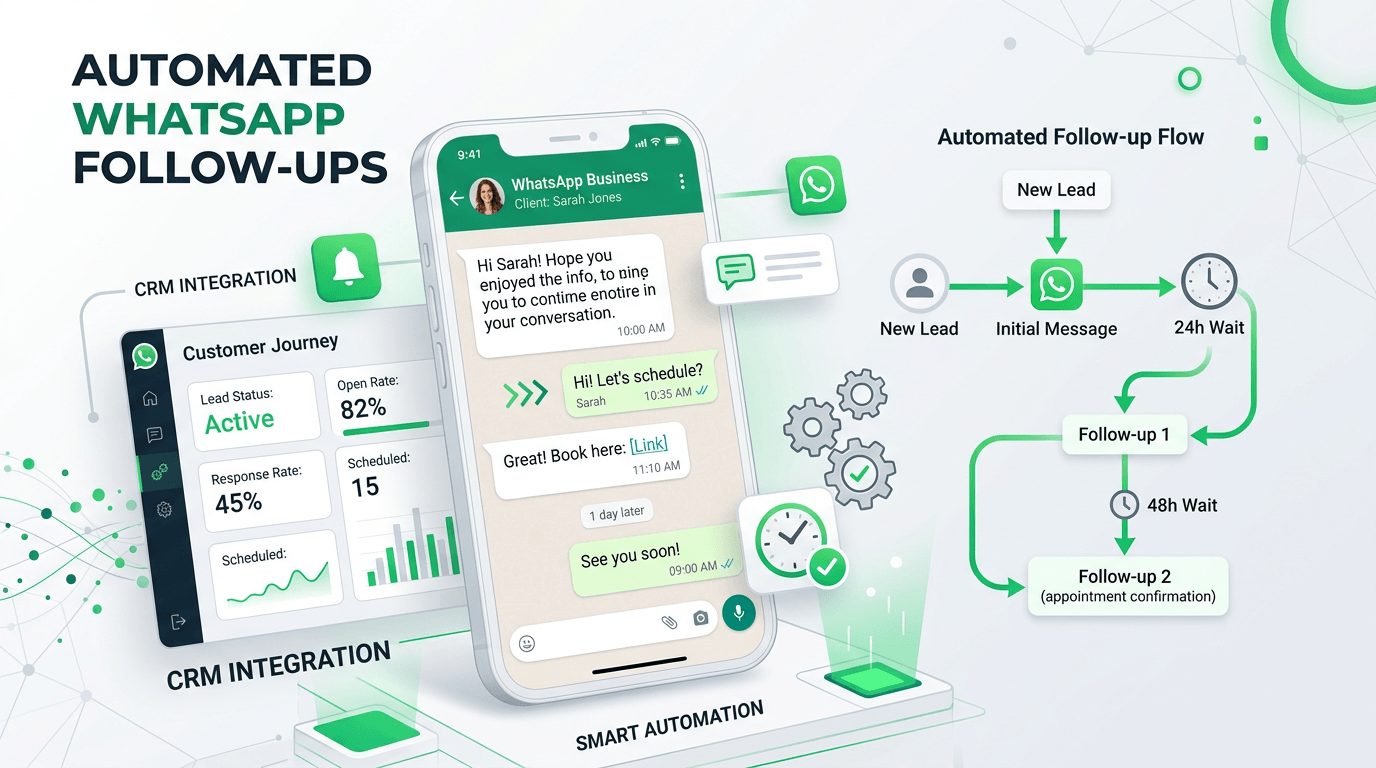
To automate WhatsApp follow-ups, connect WhatsApp to a CRM, set triggers (like "no reply in 24 hours") that fire pre-written messages automatically, and let the system chase every lead on a schedule while it stops the moment someone replies. In short: you write the messages once, define when they send, and the CRM does the chasing — so no lead ever slips because someone forgot to follow up.
Why automated follow-ups matter
Most deals aren't lost to a "no" — they're lost to silence. A lead messages, gets one reply, then the thread goes quiet because your team is busy. Manual follow-up depends on memory and free time, and both run out. Automation fixes the root problem: every lead gets a timely, consistent nudge whether or not anyone remembers, and the sequence stops automatically when they respond so nobody gets spammed.
What you need before you start
- WhatsApp connected to a CRM — via QR code (your existing number) or the official WhatsApp Cloud API for higher volume.
- A clear trigger — what event starts the sequence (new lead, no reply, abandoned checkout, missed call).
- Opt-in contacts — only message people who agreed to hear from you; it keeps you compliant and your number healthy.
- A pipeline so the system knows each lead's stage and can stop following up once they convert.
Step by step: set up an automated follow-up sequence
Step 1 — Connect WhatsApp to your CRM
Link your number by scanning a QR code or connecting the official Cloud API. From here every incoming chat lands in a shared inbox the automation can act on. (In Foxaf this is the WhatsApp CRM inbox.)
Step 2 — Choose your trigger
Decide what kicks off the sequence. Common triggers:
- A new lead enters the pipeline.
- A contact hasn't replied within X hours.
- A deal sits in one stage too long.
- A customer abandons an order or booking.
Step 3 — Write the message steps
A good sequence is usually 3–5 messages spaced over a few days. Lead with value, not pressure: a reminder, a helpful answer, a small incentive, then a polite final check-in. Keep each message short and human.
Step 4 — Set the timing
Space messages so they feel like a person, not a robot. A reliable rhythm is: immediately, then +1 day, +3 days, +7 days. Send during local daytime hours so you respect your audience.
Step 5 — Add a stop condition
This is the most important rule: the sequence must stop the instant the lead replies (or moves to a "Won"/"Closed" stage). Set this once and the system handles it, so an interested lead never receives a "just following up" message after they've already answered.
Step 6 — Personalise with merge fields
Insert the contact's name, the product they asked about, or their order number using dynamic fields. Personalised follow-ups read as one-to-one even when they're automated.
Step 7 — Test, launch, and review
Run the sequence on yourself first. Then turn it on and check your reports weekly — reply rate, conversion, and where leads drop off — and tweak the wording or timing.
Copy-paste WhatsApp follow-up templates
Swap the placeholders in {curly braces} for your own details. Keep them conversational.
1. New lead — instant reply
Hi {name}! Thanks for reaching out to {business}. I'd love to help you with {product/service}. Quick question to point you the right way — what are you hoping to achieve?
2. No reply after 24 hours — gentle nudge
Hi {name}, just checking you saw my last message about {product/service}. Happy to answer any questions whenever you're ready.
3. No reply after 3 days — add value
Hi {name}! Thought this might help while you decide: {useful tip / link / quick answer}. Want me to put together a quick recommendation for your situation?
4. No reply after 5 days — light incentive
Hi {name}, still keen to help you with {product/service}. If it's useful, I can hold {offer / current price / availability} for you — just say the word.
5. Final check-in (day 7) — easy out
Hi {name}, I don't want to keep messaging if the timing isn't right. Should I close this off for now, or is there anything I can help with? Either answer is totally fine.
6. COD order confirmation (eCommerce)
Hi {name}! Confirming your order #{order_no} for {item}, cash on delivery to {area}. Reply YES to confirm and we'll dispatch today.
7. Abandoned checkout / booking
Hi {name}, looks like you didn't finish your {order/booking}. Want me to complete it for you here on WhatsApp? Takes 30 seconds.
Mistakes to avoid
- No stop condition — chasing people who already replied is the fastest way to annoy leads.
- Too many messages, too fast — space them out; daily blasts feel like spam.
- Messaging people who never opted in — risks your number and breaks WhatsApp's rules.
- Generic copy — use the contact's name and context, or it reads as a blast.
Why this works better in Pakistan and emerging markets
Where WhatsApp is the main buying channel — and COD is the norm — automated, well-timed follow-ups directly lift order confirmations and cut returns. Foxaf is built for exactly this, with flat pricing at $47/mo and no per-message markup, so following up more often doesn't inflate your bill. [PKR: confirm] See the local angle on our WhatsApp CRM for Pakistan page.
Stop chasing leads by hand — automate your follow-ups with the Foxaf WhatsApp CRM.
Frequently asked questions
How do I automate WhatsApp follow-ups without getting banned?
Only message contacts who opted in, use approved templates for the first business-initiated message where required, space your messages out, and always include a stop condition. A compliant CRM helps you follow WhatsApp's rules automatically.
How many follow-up messages should a sequence have?
Usually 3–5, spaced over about a week. Lead with value and end with a polite, easy-out final check-in. More than that, sent too quickly, starts to feel like spam.
Will leads know the messages are automated?
Not if they're written like a person and personalised with the contact's name and context. The goal is timely and relevant, not robotic — and automation simply guarantees the message actually goes out.
Can I stop the sequence when someone replies?
Yes — and you should. A good WhatsApp CRM stops the automation the moment a lead replies or moves to a closed stage, so interested people never get a "just following up" message after answering.
Do I need the WhatsApp API to automate follow-ups?
Not always. With Foxaf you can start on a QR-connected number for smaller volumes and upgrade to the official Cloud API when you need higher throughput or multiple agents.