How to Manage WhatsApp Leads in a Pipeline
Learn how to manage WhatsApp leads in a pipeline: capture, qualify, follow up and close. A step-by-step system so no lead is lost in your chats.
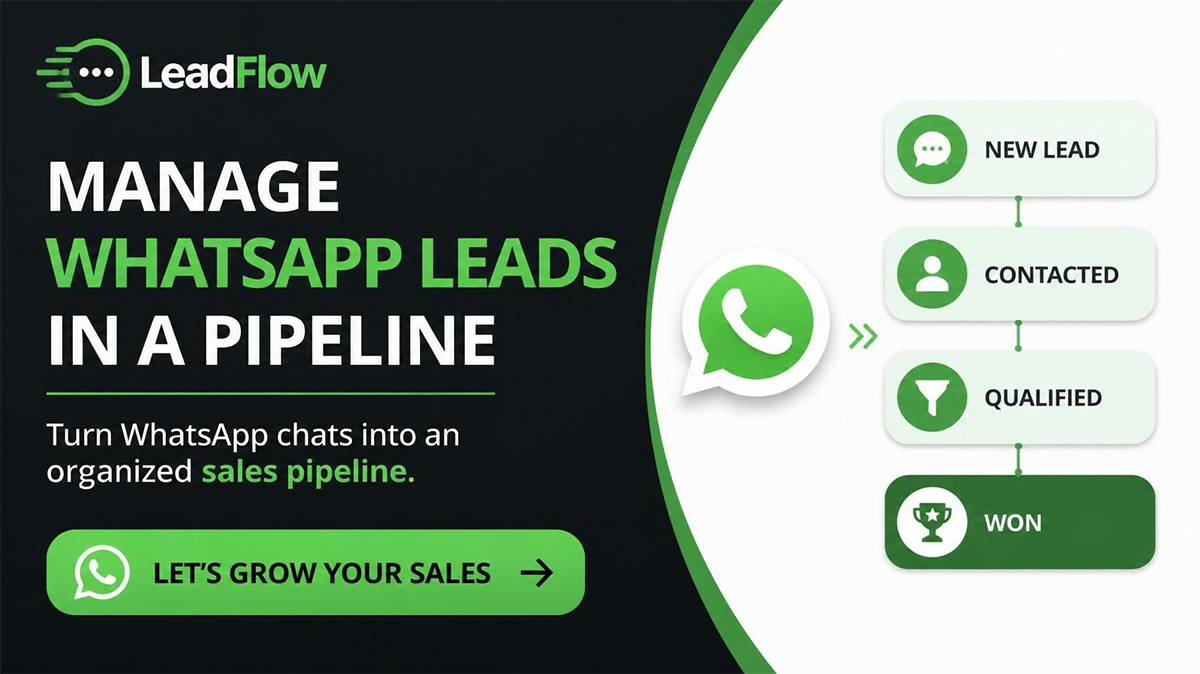
To manage WhatsApp leads, capture every chat into a CRM as a contact record, qualify each lead so you know who's worth your time, follow up on a schedule until they decide, and move them through pipeline stages to close — all without losing anyone in a sea of chats. In short: turn scattered WhatsApp conversations into an organised pipeline where every lead has an owner, a stage, and a next step.
Why WhatsApp leads get lost
WhatsApp is brilliant for starting conversations and terrible for tracking them. Chats pile up, get buried, and live on one phone. You can't tell who's a hot lead and who's a tyre-kicker, who's already been replied to, or which deal is about to close. Manage leads in your head and the busiest weeks — when you have the most leads — are exactly when the most slip through. A pipeline fixes that by giving every lead a place and a status.
The 4-stage system: capture, qualify, follow up, close
Think of lead management as a pipeline with four stages. Every WhatsApp lead moves left to right, and at any moment you can see exactly where each one sits.
Stage 1 — Capture
Get every lead into one system the moment they reach out, so nothing depends on a single phone or person.
- Connect WhatsApp via QR code or the official Cloud API so chats flow into a shared inbox.
- Pull in leads from every source — WhatsApp click-to-chat ads, your website form, your link-in-bio — so they all land in the same place.
- Auto-create a contact record for each new chat: name, number, source, and first message.
- Tag the lead on arrival (e.g. product interested in, location) so it's easy to sort later.
Stage 2 — Qualify
Not every lead deserves equal effort. Qualifying tells you who to prioritise.
- Ask 2–3 quick questions in chat: what they need, budget or quantity, and timeline.
- Mark each lead hot, warm, or cold with tags or a custom field.
- Use a simple chatbot to ask the opening questions automatically, then hand hot leads to a human.
- Move qualified leads into the pipeline; park or close the ones that aren't a fit.
Stage 3 — Follow up
Most leads need several touches before they buy. This stage is where deals are won or lost.
- Set automated follow-ups so a lead who goes quiet still gets a timely nudge.
- Keep all context — chat history, notes, tags — on the contact record so any team member can pick up the thread.
- Space messages sensibly (e.g. +1 day, +3 days, +7 days) and stop the sequence the moment they reply.
- Assign an owner to every lead so it's always clear who's responsible.
Stage 4 — Close
Turn interest into a confirmed sale and a clean record.
- Move the deal through stages — Qualified, Proposal, Won — by dragging it across the pipeline.
- For eCommerce, confirm the order in chat (cash on delivery where relevant) before dispatch.
- Record the outcome so your reporting stays accurate.
- Set a post-sale follow-up to drive repeat business and referrals.
Set up your WhatsApp lead pipeline
- Define your stages to match how you actually sell — e.g. New, Qualified, Follow-up, Won, Lost.
- Connect WhatsApp so every chat creates or updates a contact automatically.
- Add tags and custom fields for source, product, and lead temperature.
- Assign owners so no lead is unowned.
- Turn on automations for instant replies and timed follow-ups.
- Review weekly — check where leads stall and tighten that stage.
Habits that keep a pipeline healthy
- One source of truth. All leads live in the CRM, not on personal phones.
- Every lead has a next step. If a lead has no scheduled action, it will go cold.
- Keep stages current. Drag deals as they progress so your view reflects reality.
- Log the outcome. Won or lost, record it — that's what makes your reports trustworthy.
Why this matters more in Pakistan and emerging markets
Where WhatsApp is the primary sales channel and cash on delivery is common, lead volume on WhatsApp is high and the margin for lost leads is small. A pipeline built around WhatsApp — not a traditional CRM with chat bolted on — keeps every lead organised from first message to confirmed order. Foxaf is built for this, with flat pricing at $47/mo and no per-contact fees, so managing more leads never inflates your bill. [PKR: confirm]
Turn scattered chats into a pipeline that closes — manage your WhatsApp leads with Foxaf.
Frequently asked questions
What's the best way to manage WhatsApp leads?
Capture every chat into a CRM as a contact, qualify each lead, follow up on a schedule, and move them through pipeline stages to close. The key is that every lead has an owner, a stage, and a next step — so none gets lost.
How do I capture WhatsApp leads automatically?
Connect WhatsApp to a CRM via QR code or the official Cloud API. From then on, every new chat auto-creates a contact record with the lead's name, number, source, and first message, so nothing depends on one phone.
How do I qualify a WhatsApp lead?
Ask 2–3 quick questions about their need, budget or quantity, and timeline — manually or with a chatbot — then tag the lead hot, warm, or cold and prioritise accordingly.
Can I track which stage each lead is at?
Yes. A WhatsApp CRM pipeline shows every lead's stage at a glance — New, Qualified, Follow-up, Won, Lost — and you drag deals across as they progress, so you always know what's hot.
How much does a WhatsApp CRM for lead management cost?
It varies, and some tools charge per contact, which gets expensive as your lead list grows. Foxaf uses flat pricing at $47/month with no per-contact fees — see [pricing](/pricing). [PKR: confirm]