
Free quotation maker: create a professional quote in minutes
Fill in the form and get a clean quotation format with your logo, items, discount, GST or VAT and terms. Download it as a PDF or send it on WhatsApp. It is free, runs in your browser and needs no sign-up.
| Quote no. | Q-0001 |
| Date | — |
| # | Description | Qty | Unit price | Amount |
|---|---|---|---|---|
| Your items appear here | ||||
| Subtotal | INR 0.00 |
| Total | INR 0.00 |
Your print window opens. Choose “Save as PDF” as the printer.
Opens WhatsApp with a short summary of the quote. Enter the customer’s number, or leave it empty to pick the chat in WhatsApp. A link can’t attach files, so download the PDF first and attach it in the chat.
What to put on a quotation
A good quotation format answers every question the customer would otherwise ask you on WhatsApp. These are the parts to include, and the generator above has a field for each one.
- Your business details. Name, address, phone and email, with your logo. If you are registered for tax, add your tax number here too.
- Who it is for. The customer’s name or company, and how to reach them.
- Quote number and date. A number you can refer to later (Q-0001, Q-0002) and the date you issued it.
- Valid until. Prices change. A clear expiry date stops an old quote being accepted months later.
- Line items. One line per product or service, with quantity, unit price and amount. Specific descriptions prevent arguments later.
- Discount and tax. Show any discount on its own line, then the tax label and rate, and say whether prices include tax or tax is added on top.
- Total. One clear figure in one currency.
- Notes and terms. Payment terms (for example 50% advance), delivery time, what is not included, and how to accept.
Quotation format for Pakistan, India and the UAE
The layout is the same everywhere. What changes is the tax label, the tax numbers you show and the currency.
Pakistan
Sales tax is commonly shown as GST on quotations. Sales tax on goods is collected federally, while sales tax on services is set by each province, so the rate depends on what you sell and where. If you are registered, show your NTN and sales tax registration number (STRN) under your business details. Pick PKR, keep the label as GST or change it to “Sales Tax”, and enter the rate that applies to you.
India
Quotations show GST, and the rate varies by product or service (it follows the item’s HSN or SAC code), so there is no single rate to use. If you are registered, show your GSTIN. Within a state, GST is split into CGST and SGST; between states it is IGST. This tool shows one tax line, so for a split you can label it “GST (CGST + SGST)” with the combined rate and note the split under terms.
United Arab Emirates
Use the label VAT. The standard UAE VAT rate is 5%, though some supplies are zero-rated or exempt. If you are VAT registered, show your TRN (tax registration number). Pick AED and enter 5 as the rate where the standard rate applies.
This is general guidance, not tax advice. Check the rate for your products with your accountant or tax adviser.
How to send a quotation on WhatsApp
- 1. Download the PDF. Click “Download PDF” and choose “Save as PDF” in the print window. On a phone, use the share or print option to save it.
- 2. Click “Send on WhatsApp”. WhatsApp opens with a short summary: quote number, items, total and validity date. Add the customer’s number first to open their chat directly.
- 3. Attach the PDF. In the chat, tap the attach icon, choose Document and pick the PDF you saved. Send the summary with it.
- 4. Follow up. If you haven’t heard back a few days before the quote expires, send a short reminder in the same chat.
Want customers to reach you in one tap? Put a click-to-chat link in your quote’s terms or your email signature with our free WhatsApp link generator.
Know when your quote is opened
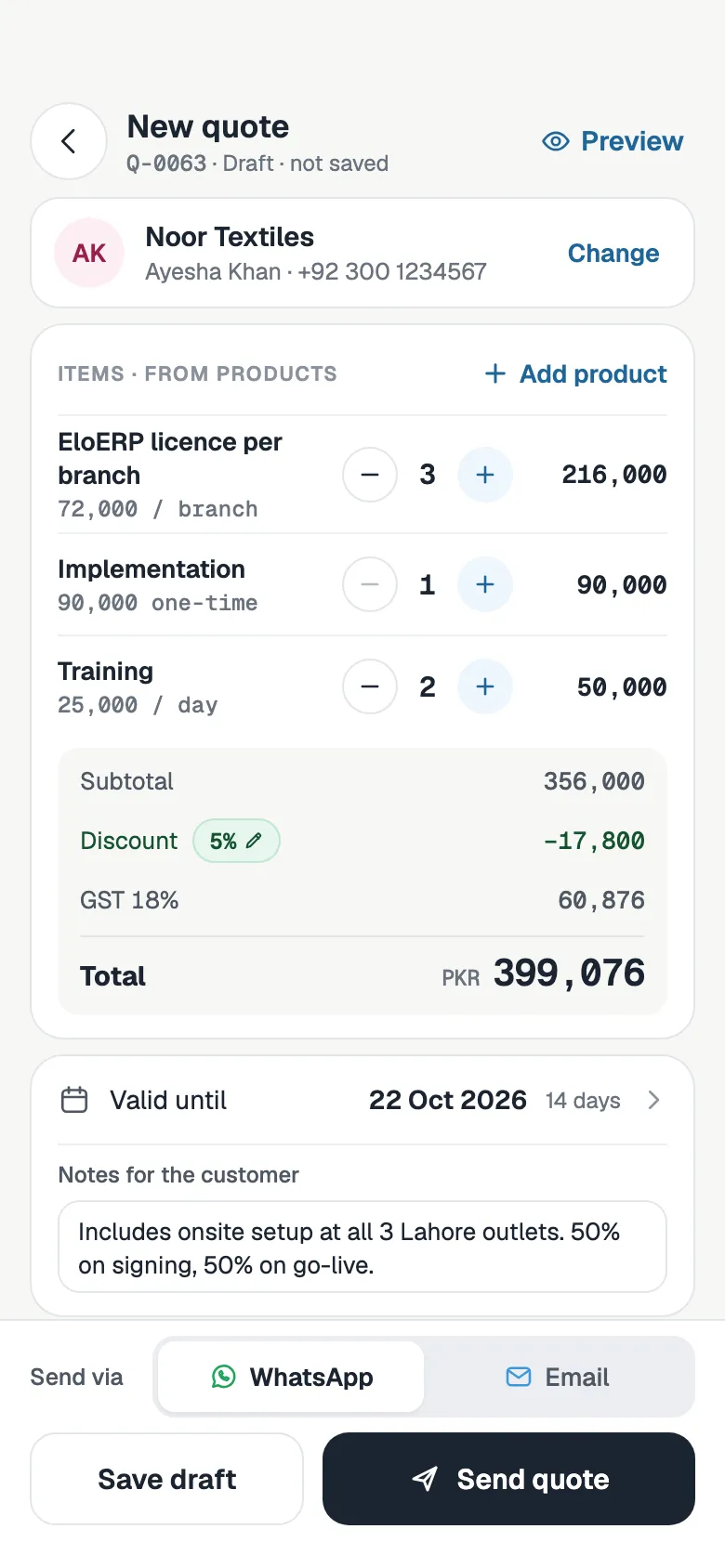
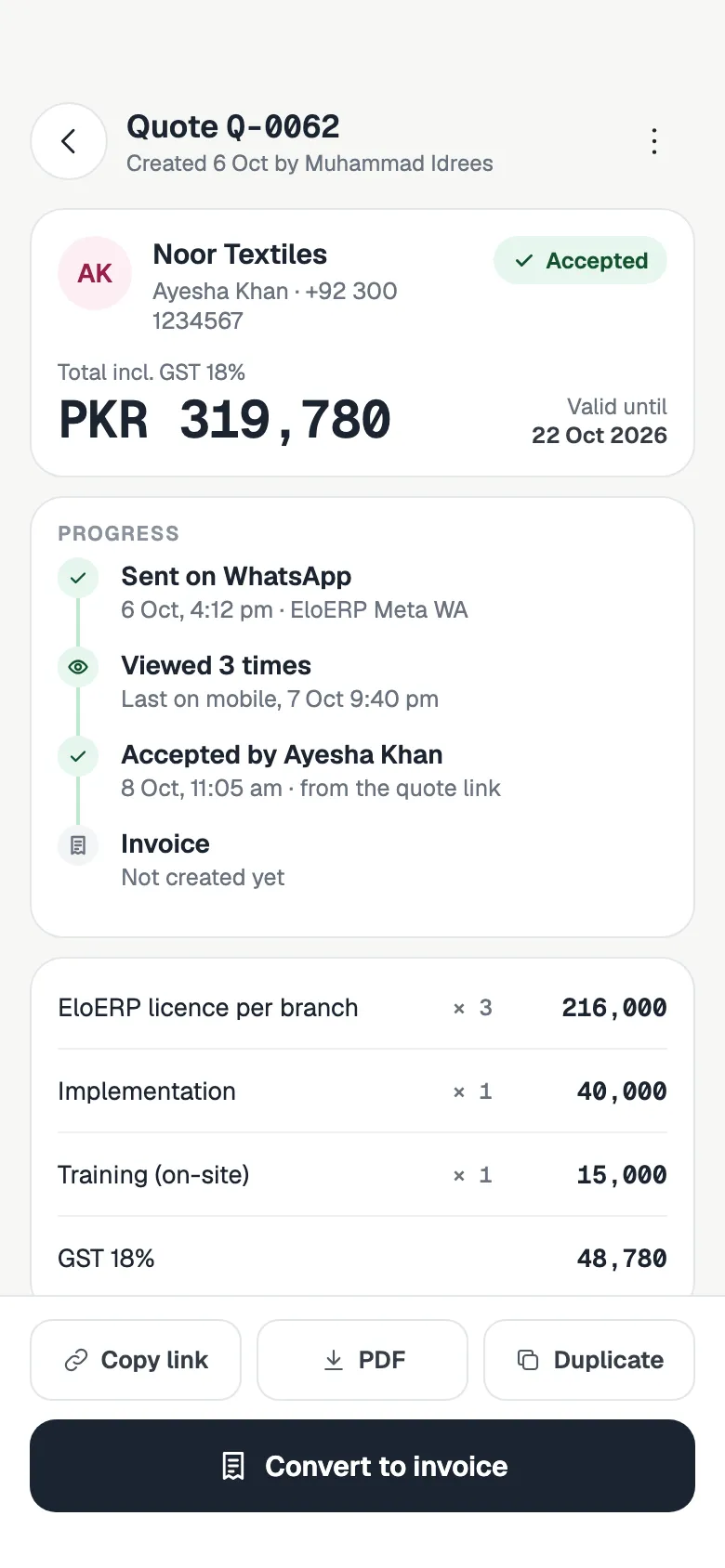
A PDF in a chat tells you nothing after you send it. In FOXAF, each quote has its own link. You can see when the customer opens it, they accept it from that link, and you turn it into an invoice without typing it again.
- See when a quote is viewed and how many times
- The customer accepts from the quote link, with a signature if you ask for one
- Convert an accepted quote to an invoice in one step
- Send the quote with its PDF on WhatsApp or by email, from the same inbox as your chats
Quotation generator FAQ
Is this quotation generator free?
Yes. It is free to use, runs in your browser and needs no sign-up. Make as many quotations as you need.
What is the format of a quotation?
A standard quotation format has your business details and logo, the customer's details, a quote number, the date and a valid-until date, line items with quantity, unit price and amount, any discount, the tax label and rate, the total, and your notes and terms.
How do I save my quotation as a PDF?
Click Download PDF. Your browser's print window opens with only the quotation on the page. Choose Save as PDF as the printer and save the file.
How do I send a quotation on WhatsApp?
Download the PDF first, then click Send on WhatsApp. WhatsApp opens with a short summary of the quote, either in the customer's chat if you entered their number or in a chat you pick. Attach the PDF as a document and send.
Should my quotation show GST or VAT?
Use the label for your country. Quotations in Pakistan and India usually show GST, and the UAE uses VAT at a standard rate of 5%. In India the GST rate depends on the product or service, so enter the rate that applies to what you sell. You can also choose whether your prices include tax or tax is added on top.
Is my data uploaded or stored anywhere?
No. The quotation is built in your browser and your logo is read on your device, not uploaded. If you tick Remember my business details and terms, they are saved in this browser only, so the form is filled in next time.
What is the difference between a quotation and an invoice?
A quotation is an offer you send before the work or sale, with a price that is valid until a set date. An invoice asks for payment after the customer has agreed. This tool makes quotations.
Can I see if the customer opened my quotation?
Not with a PDF. In FOXAF, each quote has its own link, so you can see when it is viewed, the customer can accept it from that link, and you can convert it to an invoice.