
Get more Google reviews and answer every one
Google review management inside your CRM. Ask happy customers for a review on WhatsApp at the right moment, show your best reviews on your website, and reply to your Google reviews from the same place your team answers customers.
- Review requests on WhatsApp, SMS or email
- Sent automatically from workflows
- Review widget for your website
- AI-suggested replies
Works with your Google Business Profile. Connect it once and choose the location.
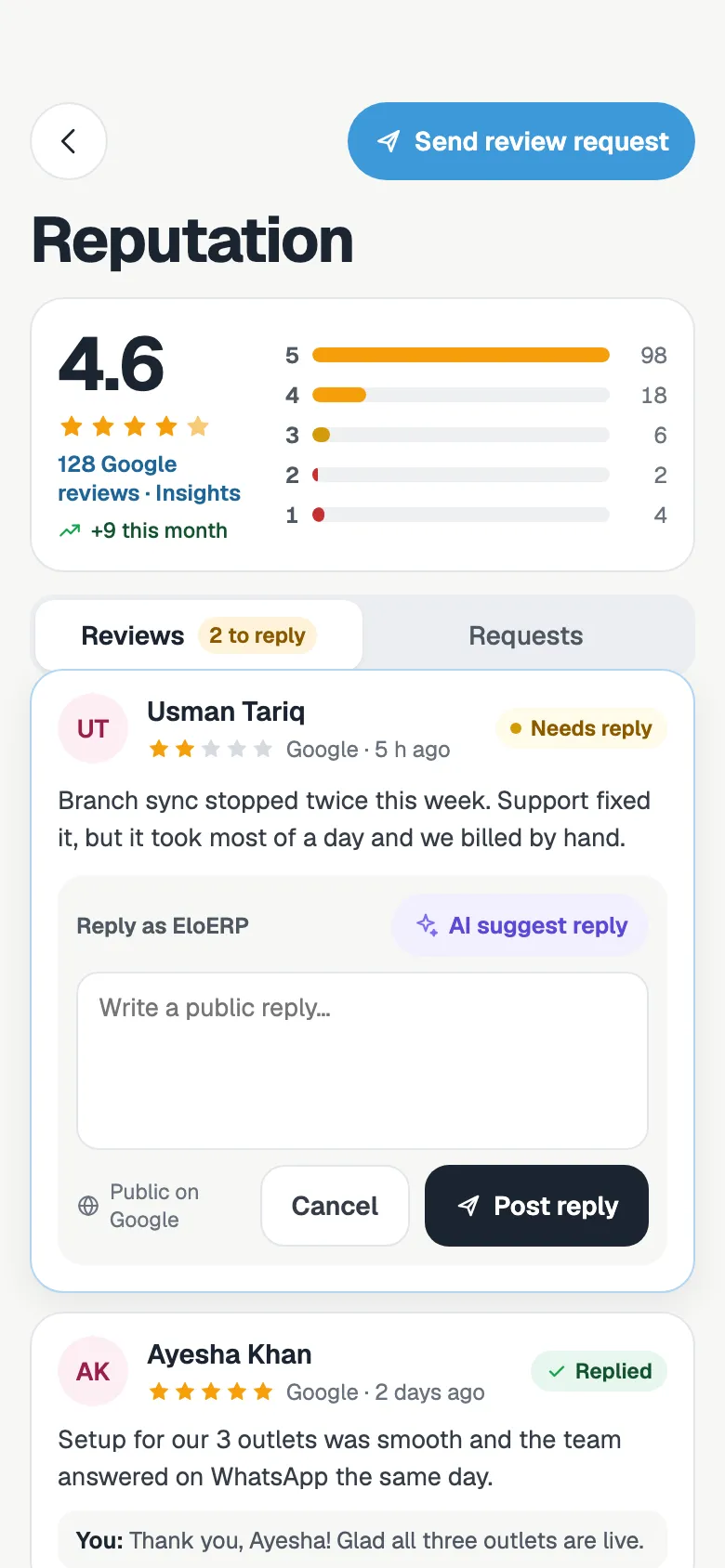
Ask at the right moment, on WhatsApp
The best time to ask is right after a good experience. FOXAF can send the request for you, from the WhatsApp line your customer already talks to.
- Step 1
Trigger it from a workflow
Add a “Send review request” step to a workflow, for example when a deal moves to Won or an invoice is paid. Or send requests by hand.
- Step 2
The customer gets a short message
On WhatsApp, SMS or email, written in your words with their first name and a link to your review page.
- Step 3
They rate you in a few taps
A simple page with your branding asks for a star rating and a comment. Every answer is saved in FOXAF.
- Step 4
A gentle follow-up
If they have not responded, FOXAF can send a follow-up after a few days. You choose the delay and how many.
Show your best reviews on your site
Good reviews help most where a buyer is deciding. Put them on your website with one line of code.
One line to install
Paste a single script tag into your website. The widget loads your reviews and stays up to date on its own.
You choose what shows
Set a minimum star rating and how many reviews to show, up to 20. Only reviews you mark as public appear.
Badge or full list
Show a compact rating badge or a list of recent reviews, in a light or dark theme.
A QR code for the counter
Print the QR code for your shop, clinic or receipts. Customers scan it and leave a review, no link needed.
See what is working
Average rating, the spread of stars, your reply rate and how many requests turned into reviews, over 7, 30 or 90 days.
Rotate the link any time
Generate a new widget code if you need to. The widget and the QR code change together.
Reply to Google reviews in one place
A quick, polite reply shows future customers that someone is listening. FOXAF brings your Google reviews next to the rest of your customer conversations.
- Step 1
Connect your Google Business Profile
Sign in with Google, pick the business location, and sync its reviews into FOXAF.
- Step 2
Get a suggested reply
The AI reads the rating and the review and drafts a short reply in your business’s name. Nothing is posted until you choose to.
- Step 3
Post it to Google
Edit the reply if you want, then post it. It appears publicly under the review on Google.
Reviews that know who the customer is
A review tool on its own sees a star rating. FOXAF sees the customer behind it.
On the contact
Requests and the answers to them are tied to the contact, so you can see who was asked and who replied.
Replies land in the inbox
If a customer answers your WhatsApp review request with a message, it comes into your shared inbox like any other chat.
One place for the team
Your team can see and answer reviews without sharing the Google login.
Google review management, answered
What is Google review management?
It is the work of asking customers for reviews, keeping an eye on new ones and replying to them. FOXAF does this inside your CRM: review requests go out on WhatsApp, SMS or email, and your Google reviews and replies sit next to your customer records.
How do I ask customers for a Google review on WhatsApp?
Connect your WhatsApp line to FOXAF and send a review request from the Reputation page, or add a Send review request step to a workflow. The customer gets a short message with their first name and a link to your review page. You write the message templates yourself.
Can review requests go out automatically?
Yes. Add the Send review request step to a workflow, for example when a deal moves to Won, an appointment is booked or an invoice is paid. You can also turn on follow-ups, so customers who have not responded get a reminder after the number of days you choose.
How do I show reviews on my website?
Copy one script tag from the Reputation settings into your website. Choose a compact badge or a list of reviews, a light or dark theme, the minimum star rating and how many reviews to show, up to 20.
Can I reply to Google reviews from FOXAF?
Yes. Connect your Google Business Profile, choose the location and sync its reviews. Type a reply, or ask the AI for a suggested draft and edit it, then post it. The reply appears publicly on Google under the review.
Can customers leave a review without a link?
Yes. FOXAF gives you a QR code that opens your review page. Put it on the counter, a receipt or a delivery slip and customers can leave a review by scanning it.
Can I see whether review requests are working?
Yes. The analytics show your average rating, the spread of star ratings, your reply rate and how many requests turned into reviews, for the last 7, 30 or 90 days or all time.
Part of one CRM, not another app to log into
Start asking for reviews this week
Connect your WhatsApp line, add a review request to the workflow you already run, and put your best reviews on your website.