
Plan, approve and publish your Facebook and Instagram posts from one calendar
Write a month of posts in one sitting, get them approved without a meeting, and let FOXAF publish each one at the time your followers are online. Comments and messages come back into the same CRM your team already answers from.
- Facebook Pages and Instagram
- Approvals over WhatsApp
- Best-time posting slots
- Results in one report
Works with Facebook Pages and Instagram professional accounts (business or creator).
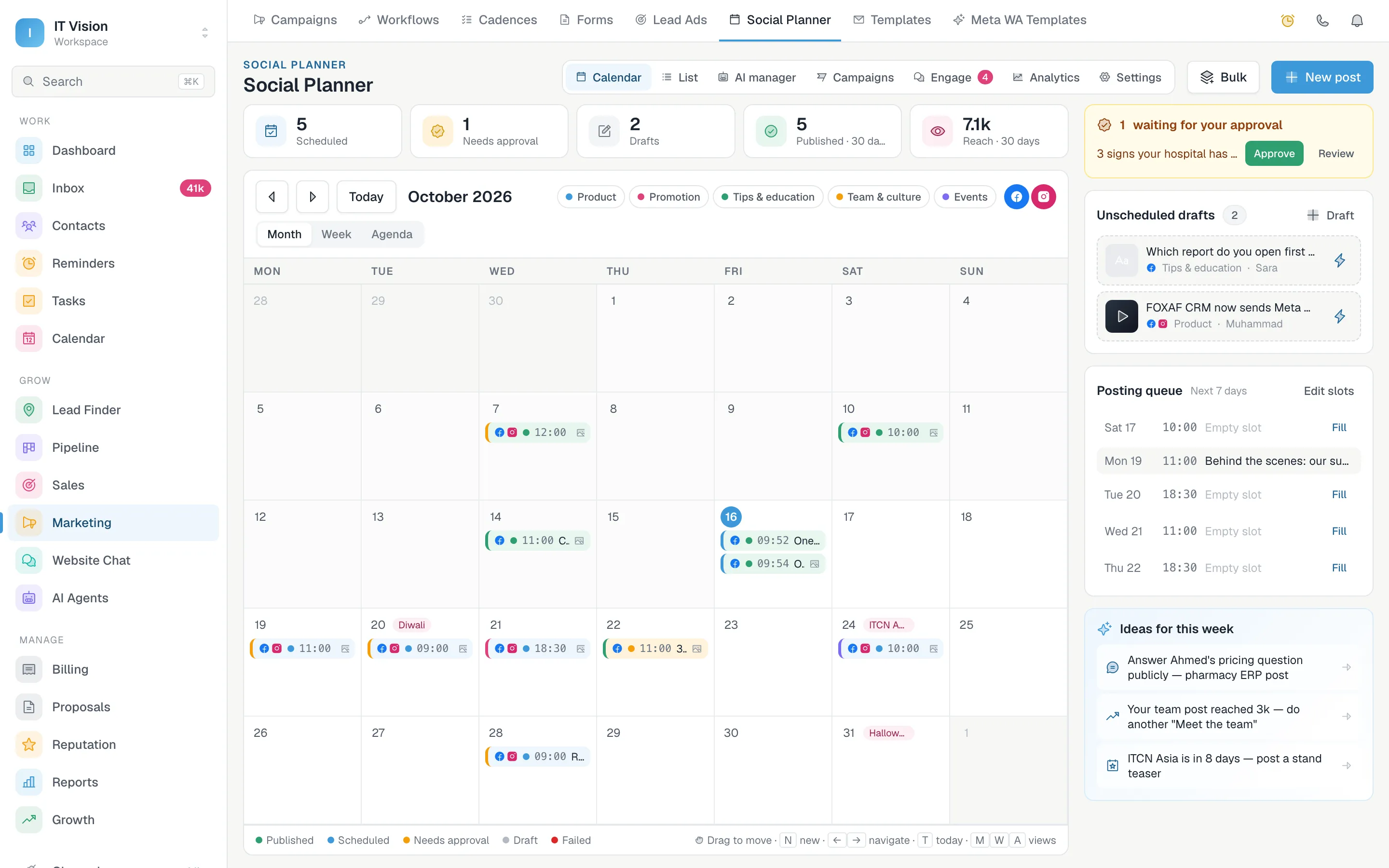
Write once, then tune it for each network
Start with one caption, then switch to the Facebook or Instagram tab to change the wording for that network only. Pull in a saved template or hashtag group, and the composer tells you what is missing before anything goes live.
- Live preview of how the post looks on Facebook and on Instagram
- Instagram checks before you schedule: media, caption length and hashtag limits
- A first comment posted right after the post, for hashtags or a link
- UTM tags and short links on every link, so clicks show up in your reports
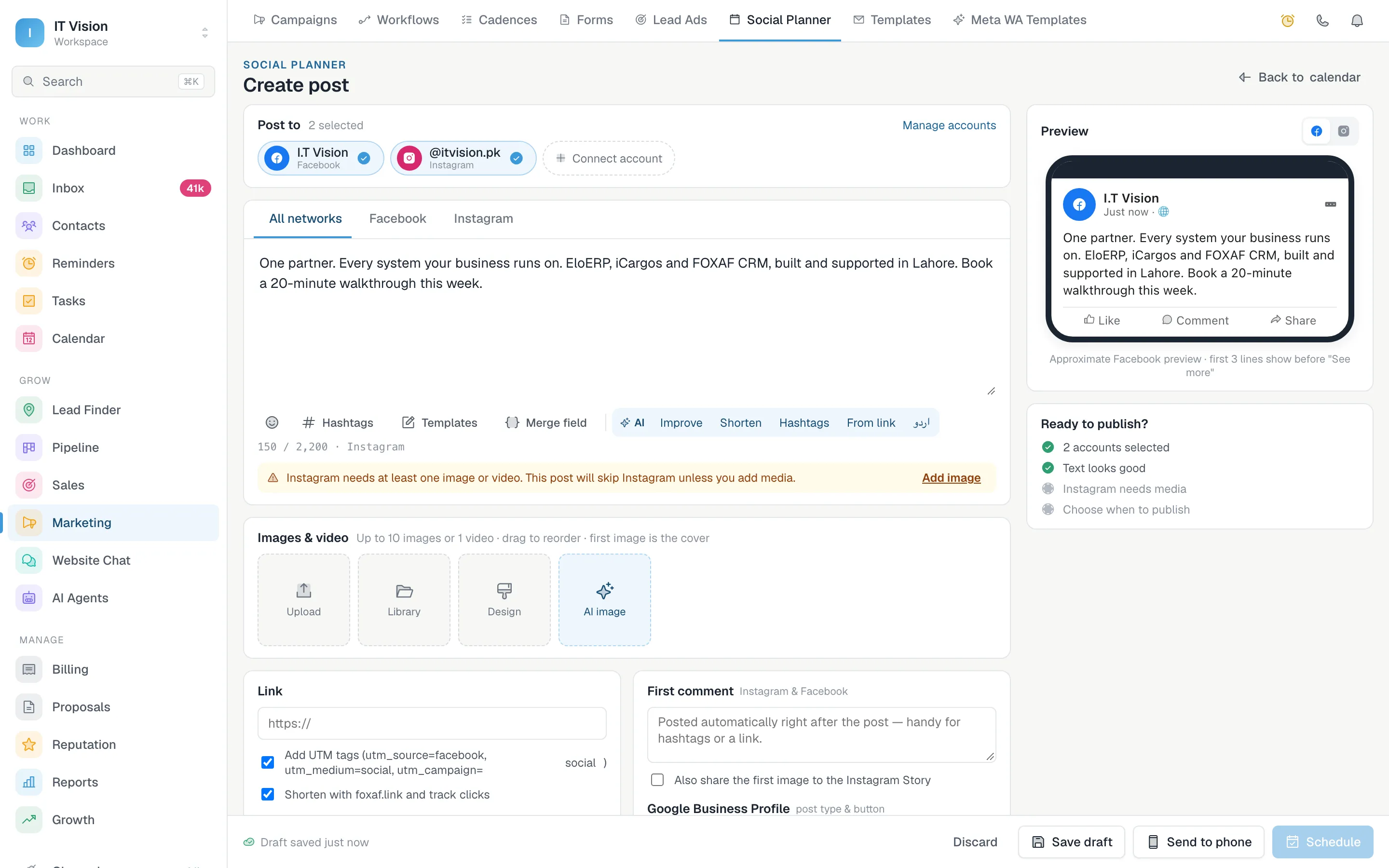
See the whole month, and fill the gaps with a queue
Set the times you want to post each week once. After that, a finished post goes into the next open slot, so the calendar stays full without anyone picking dates. The best-time suggestions come from when your own audience engages.
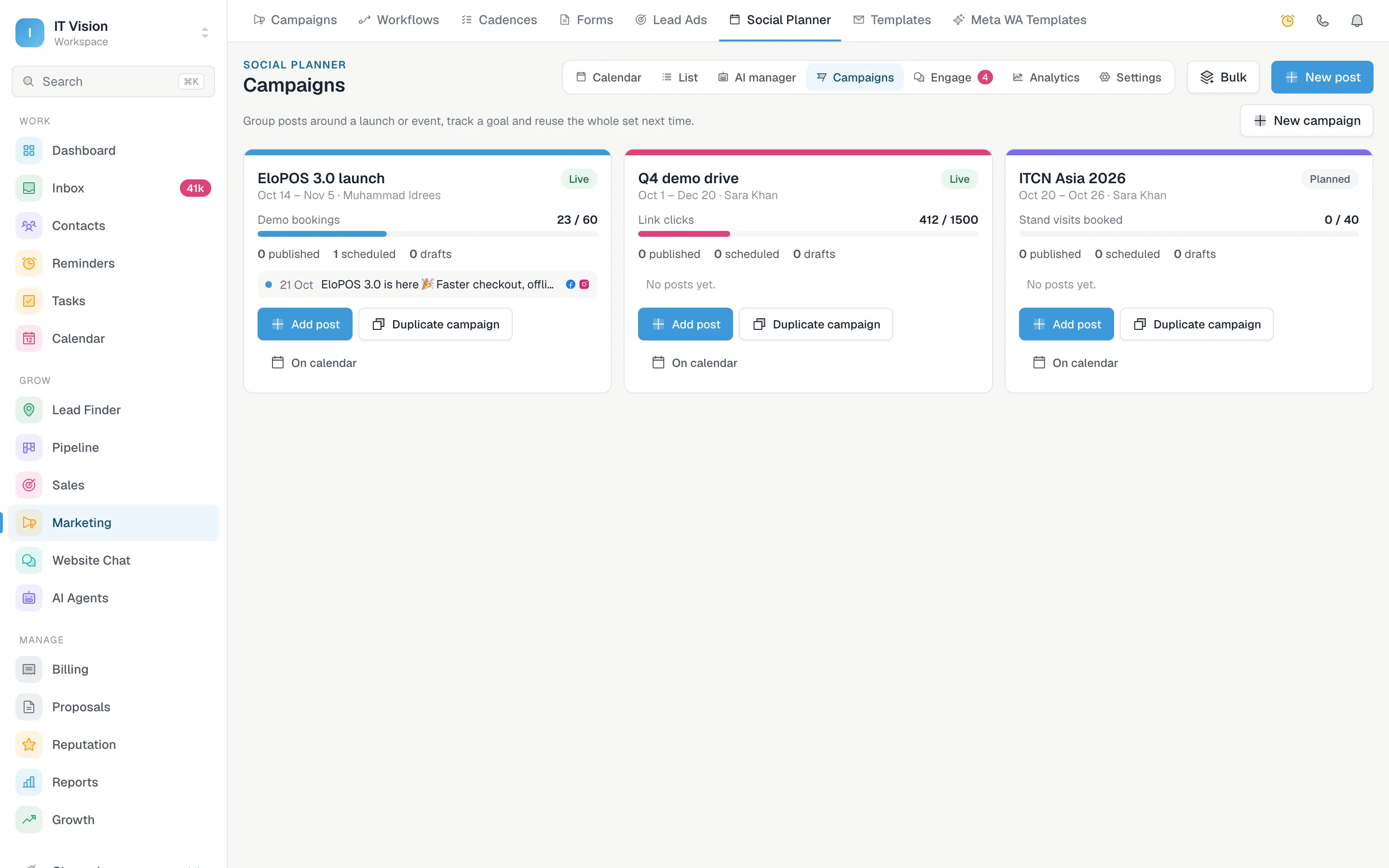
- Month, week and agenda views, plus a sortable list of every post
- Drag a post to a new day to reschedule it
- Posting slots for each weekday; “Add to queue” drops a post into the next free one
- Categories and colours, so you can see the content mix at a glance
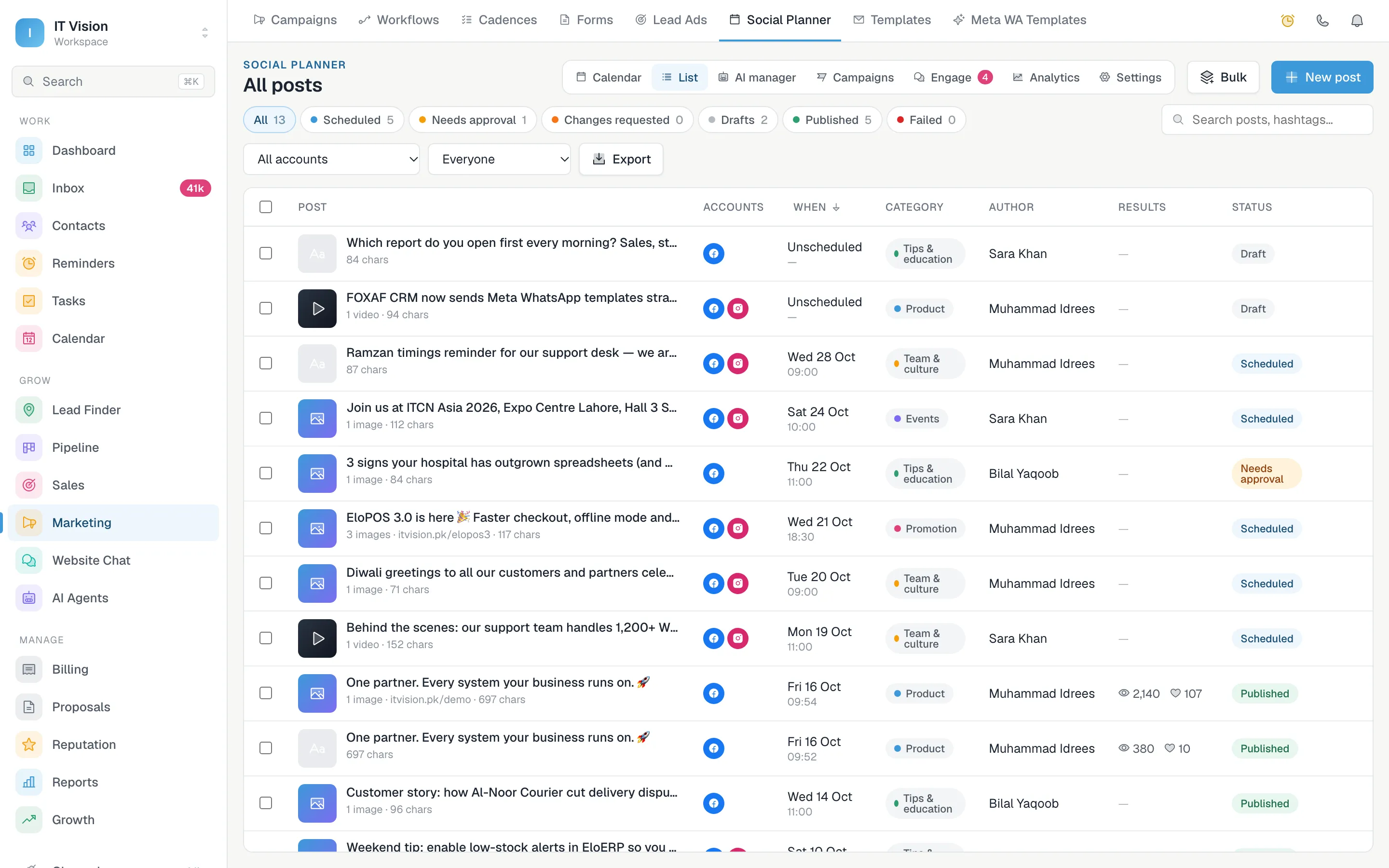
Run a launch as a campaign, or load a quarter from a spreadsheet
A product launch is rarely one post. Campaigns keep the teaser, the launch post and the follow-ups together, so you can see what has gone out and what is still waiting.
- Group the posts for a launch, an event or an offer and track a goal for the group
- Duplicate a campaign to run the same playbook next time
- Schedule up to 500 posts at once from a CSV file
- Recycle a top post instead of writing it again
Approvals without the back-and-forth
Most delays in social media are someone waiting for a yes. FOXAF takes the approval to where your manager already is.
- Step 1
A teammate drafts the post
They write it, add the media and pick the accounts. It goes to the approver instead of the calendar.
- Step 2
The approver gets a WhatsApp alert
A message tells them a post is waiting. They can approve it or ask for changes with a note.
- Step 3
It publishes on time
Approved posts go out at their scheduled time. If one fails, the author is told why and can retry.
Know which posts brought people in
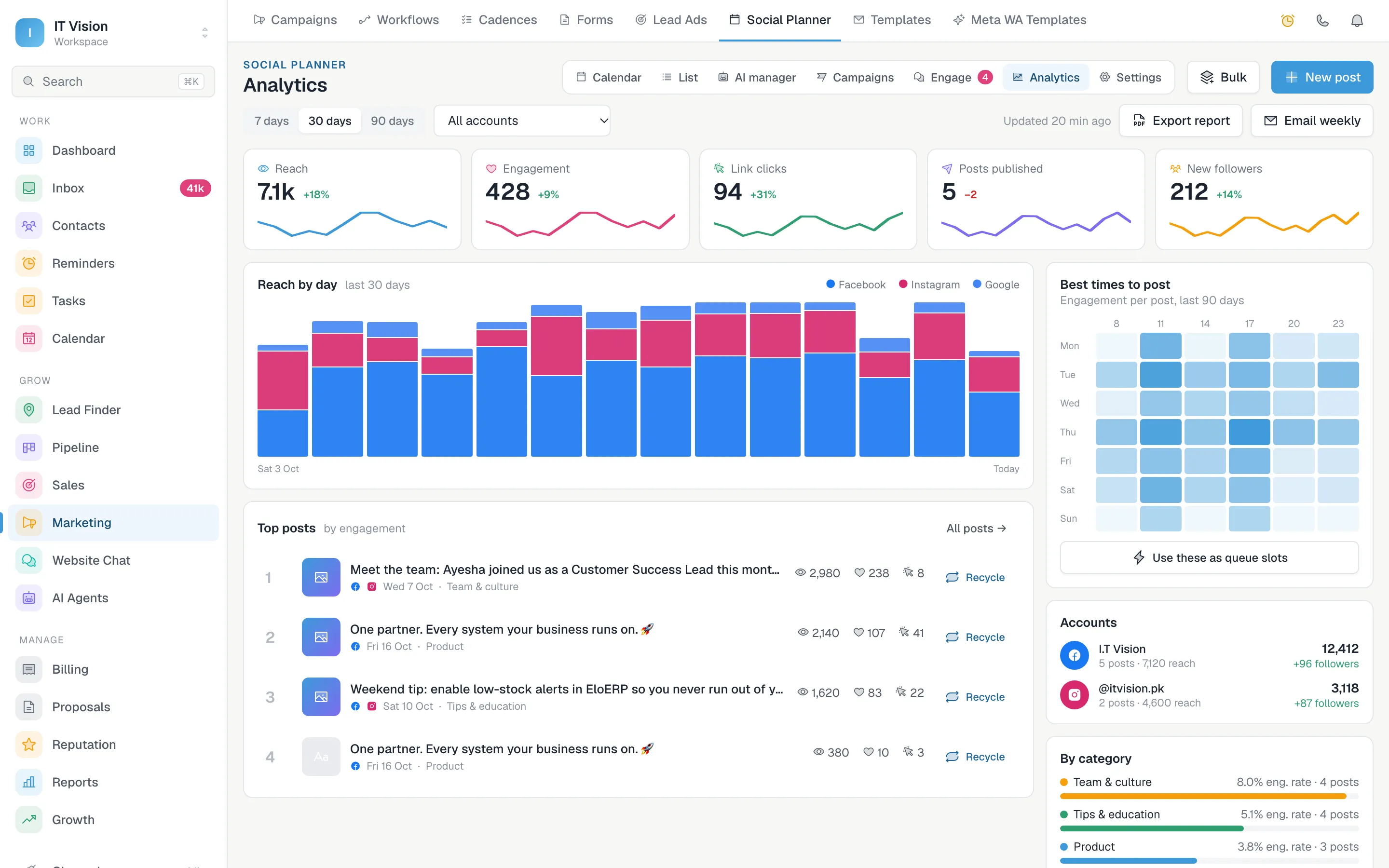
Results come straight from Facebook and Instagram, broken down by account and by category. Because FOXAF is also your CRM, a comment that turns into an enquiry becomes a contact your sales team can follow up.
- Reach, engagement, link clicks and new followers for 7, 30 or 90 days
- Top posts, with one click to recycle a winner
- A heatmap of when your audience engages, which you can turn into posting slots
- Export a PDF report, or have a summary emailed every week
A scheduler that knows who your customers are
Standalone schedulers stop at the post. FOXAF keeps going after it is published.
Comments and DMs in the inbox
Instagram and Messenger conversations land next to WhatsApp and email, so one team answers all of them.
Commenters become contacts
Turn a comment into a CRM contact with a tag and a note, ready for your sales team.
AI drafts in your voice
The AI social media manager writes posts, plans and replies from your brand brain, for you to approve.
Send a draft to your phone
Need to post a Reel from your phone? Send the finished draft to your phone and finish it there.
Alerts that matter
Hear about failed posts, posts waiting for approval and expiring connections before they cost you a day.
Built for teams
Roles decide who can draft, who can approve and who can change the settings.
Social Planner, answered
Which social networks can I schedule to?
Facebook Pages and Instagram professional accounts (business or creator). On Instagram you can schedule feed posts, carousels and Reels, and also share the first image to your Story.
Can I schedule Instagram posts and Reels automatically?
Yes. FOXAF publishes Instagram feed posts, carousels and Reels at the time you choose, through the official Instagram API. You do not need to be online or have your phone with you.
How do approvals work?
Members who need approval send their post to an approver instead of the calendar. The approver gets an alert in FOXAF and, if you switch it on, on WhatsApp. They approve it or ask for changes with a note.
What is the posting queue?
You set the times you want to post on each weekday. "Add to queue" puts a finished post into the next free slot, so you do not have to pick a date for every post.
Can I upload a month of posts at once?
Yes. Upload a CSV with up to 500 rows of text, times and media links, preview it, and schedule everything in one step.
What analytics do I get?
Reach, engagement, link clicks, new followers and your top posts, by account and by category, plus a heatmap of when your audience engages. You can export a PDF report or have a weekly summary emailed.
Is the Social Planner part of FOXAF CRM?
Yes. Comments and Instagram or Messenger messages come into the same inbox as WhatsApp and email, and a commenter can become a CRM contact in one click.
Part of one CRM, not another app to log into
A month of post ideas, an audit of your pages and Autopilot.
Answer DMs and comments with an AI agent and keyword replies.
Every channel in one queue for your whole team.
Broadcasts, automations and AI on the official WhatsApp API.
Get next month's posts planned this week
Connect your Facebook Page and Instagram account, set your posting slots and let the calendar fill itself.