
A sales CRM that tells each rep who to call next
FOXAF is a sales CRM and lead management system for teams that sell on the phone and on WhatsApp. Leads are shared out automatically, each rep opens their day to a ready queue, and every call outcome moves the deal for them.
- A call-next queue for every rep
- Fair, automatic lead assignment
- Cadences across calls, WhatsApp and email
- Commissions and approvals built in
Every rep knows who to call next
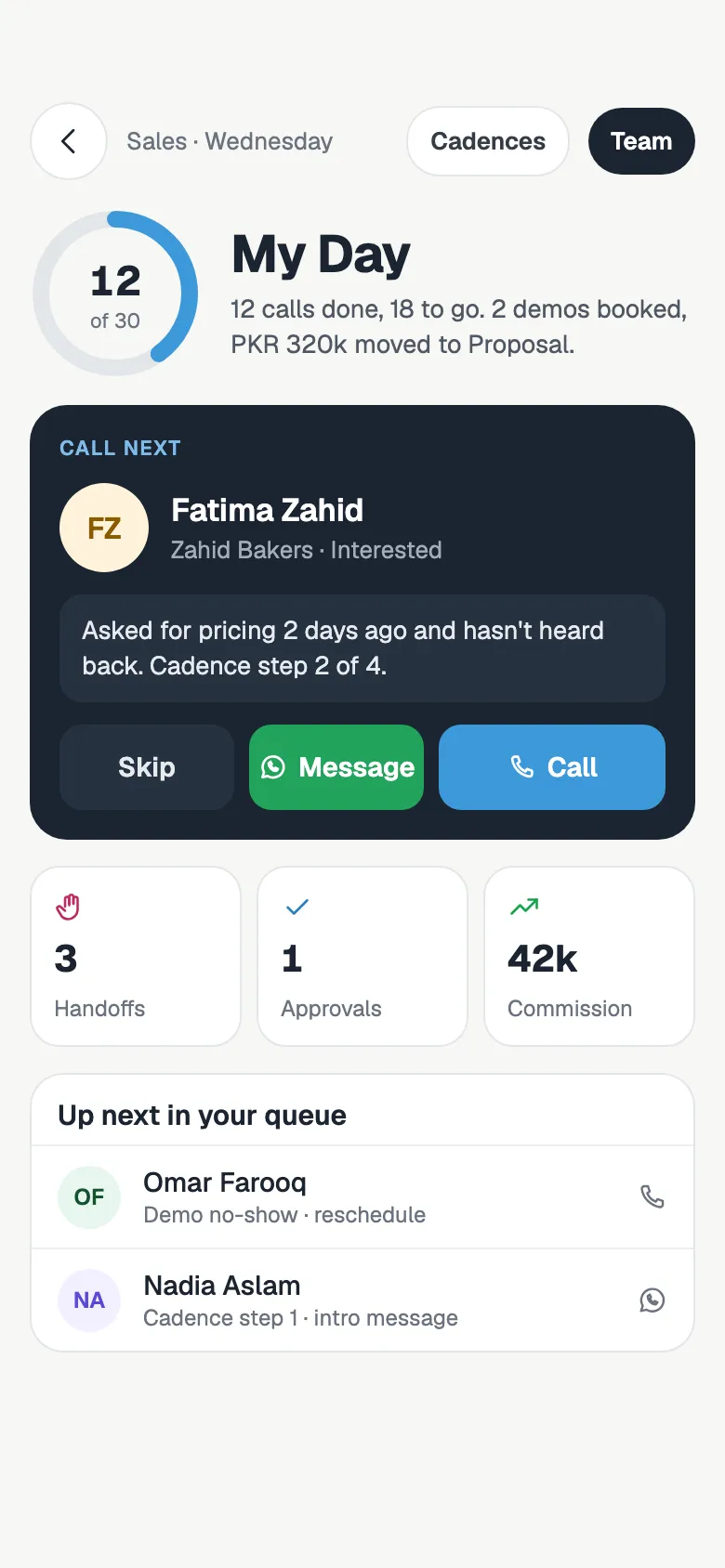
Reps lose hours deciding who to chase. My Day decides for them and puts the most urgent lead on top.
- Step 1
The queue builds itself
Hot leads and live chats come first, then chats the AI agent handed over, callbacks that are due, trials, engaged follow-ups and finally cold leads.
- Step 2
Call or message from the card
The card shows an AI summary of the conversation and the lead's last message. Call or open the WhatsApp chat from the card. Skipping a lead needs a reason.
- Step 3
Log the outcome, get the next lead
Pick what happened on the call. FOXAF updates the deal, sets the follow-up and moves on to the next lead.
Leads shared fairly, automatically
New leads from Facebook lead ads, live chats and AI agent hand-offs go only to reps who are marked available. Someone on a call or away is skipped, so the lead is not left waiting with a person who cannot answer.
When a lead changes hands, its conversations, deals and open follow-up tasks move with it.
- Workload-weighted round robin: the available rep with the fewest open leads gets the next one
- Or plain round robin: whoever has waited longest takes the next lead
- Lead caps per rep, so nobody is buried
- Rules by tag or business type, so the right specialist gets the lead
- Manual mode for any rep who should only get leads a manager gives them
Cadences across calls, WhatsApp and email
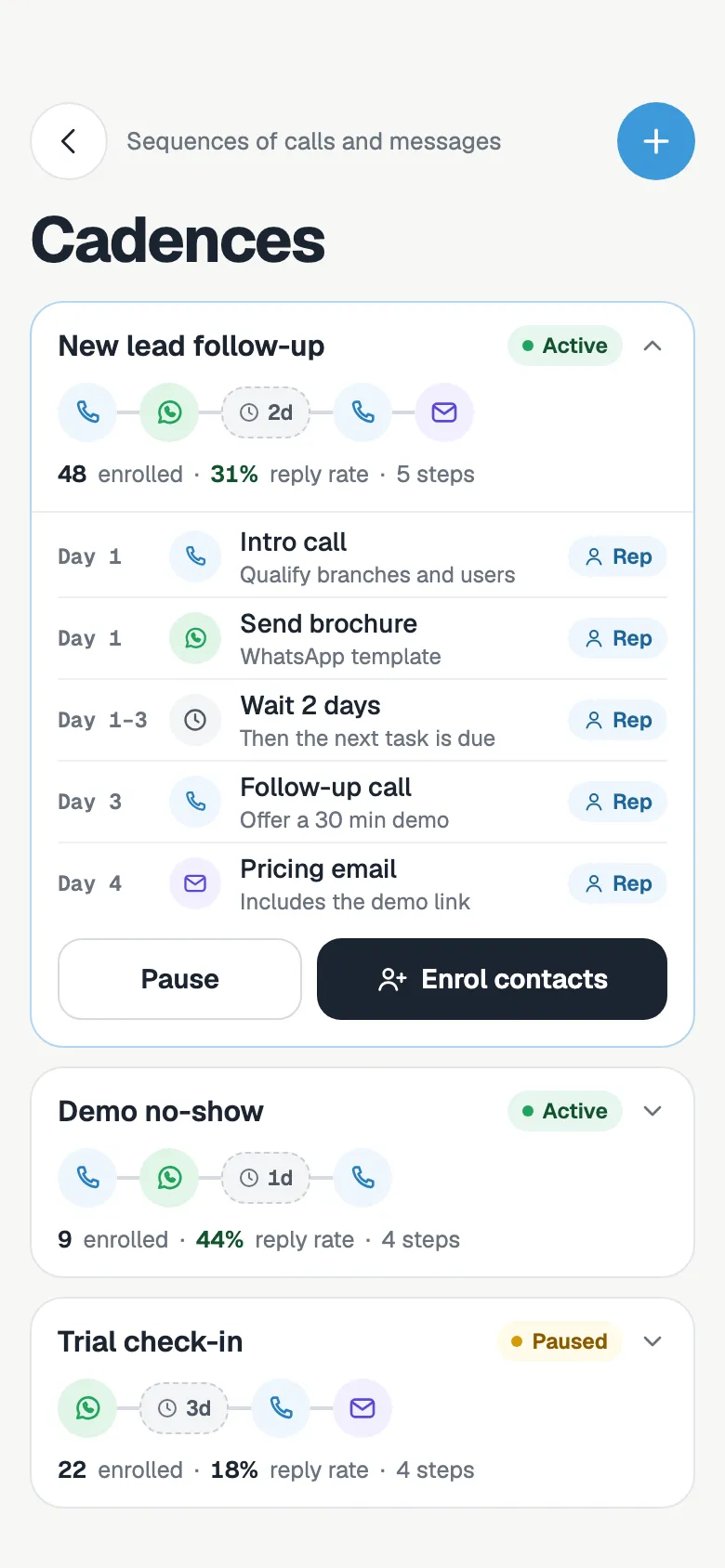
Most deals need several touches. A cadence sets them out once: a call on day one, a WhatsApp brochure the same day, a follow-up call two days later. Each touch shows up in My Day on the right date, so every lead gets the same steady follow-up, whichever rep owns it.
- Mix call, WhatsApp, email and SMS steps across the days you choose
- Each step you give a rep becomes a dated task in their queue
- Starter cadences for free trials, cold outreach, pricing objections and demo no-shows
- Call outcomes start the right one: a new trial starts the trial cadence, a pricing question starts the objection cadence
Call outcomes that move the deal for you
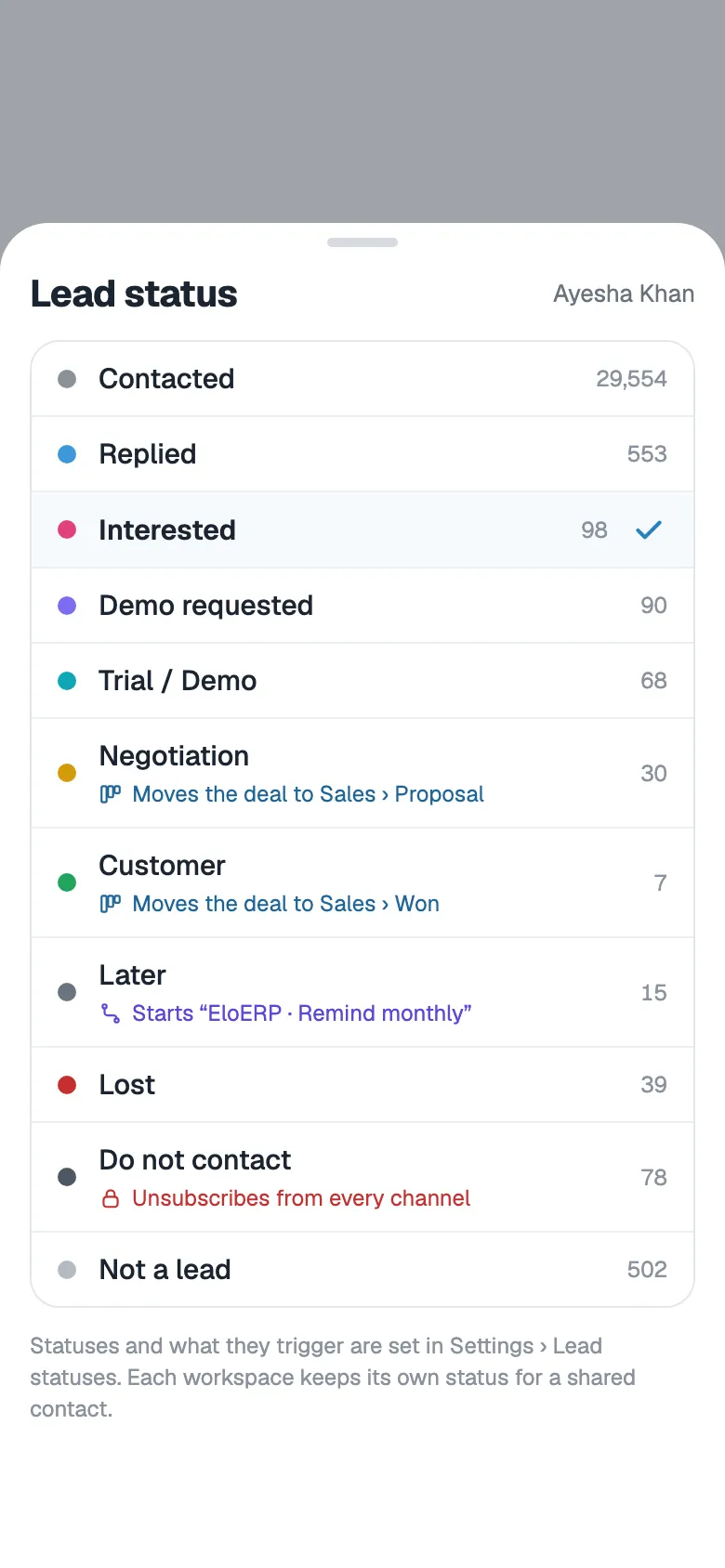
Reps do not update the CRM after a call. They pick the outcome, and FOXAF does the admin: the pipeline stage, the next task, the cadence. Managers see an accurate board without chasing anyone to fill it in.
- Interested moves the deal forward and books a follow-up if the rep did not set one
- Book a demo, start a trial or ask for pricing, and the deal moves to the matching stage
- Not interested marks the deal lost and brings the lead back later
- Callback sets a dated reminder in the rep's queue
- Each lead status can move the deal to a stage or start a workflow
A manager view that is live, not a Friday report
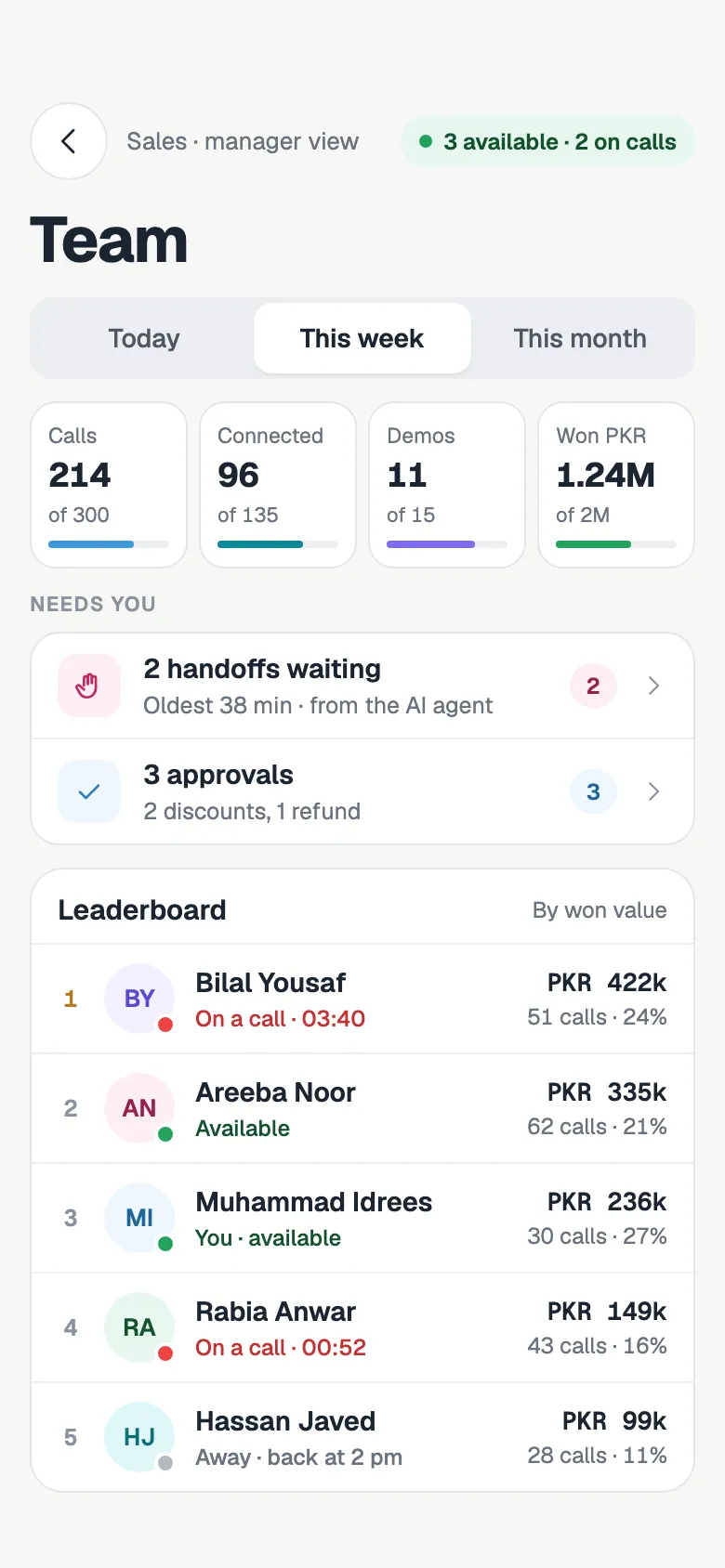
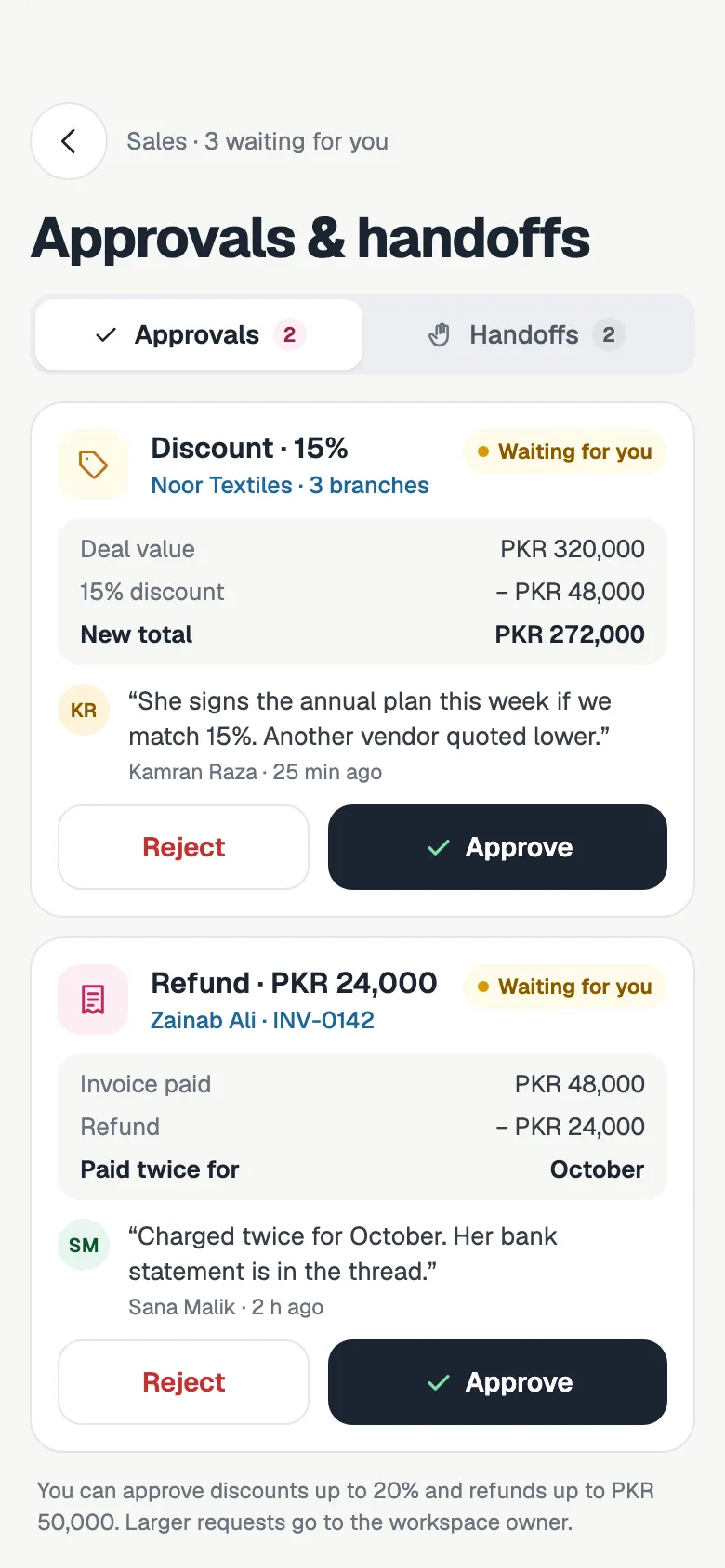
The manager console shows today's activity against targets and everything waiting on a decision. The owner report steps back to show where leads drop out of the funnel, which sources bring in sales and how many deals close with automation versus a person.
- See who is available, who is on a call and who is away
- A scoreboard of each rep's calls, follow-ups and won deals against target, and a team rank on every rep's day
- Move a rep's live leads to available teammates when they step away
- Discount and refund requests to approve or reject, with the rep's reason
- Requests a manager leaves too long escalate to the workspace owner
- Chats the AI agent handed to a person, waiting for someone to take them
Commissions without spreadsheets
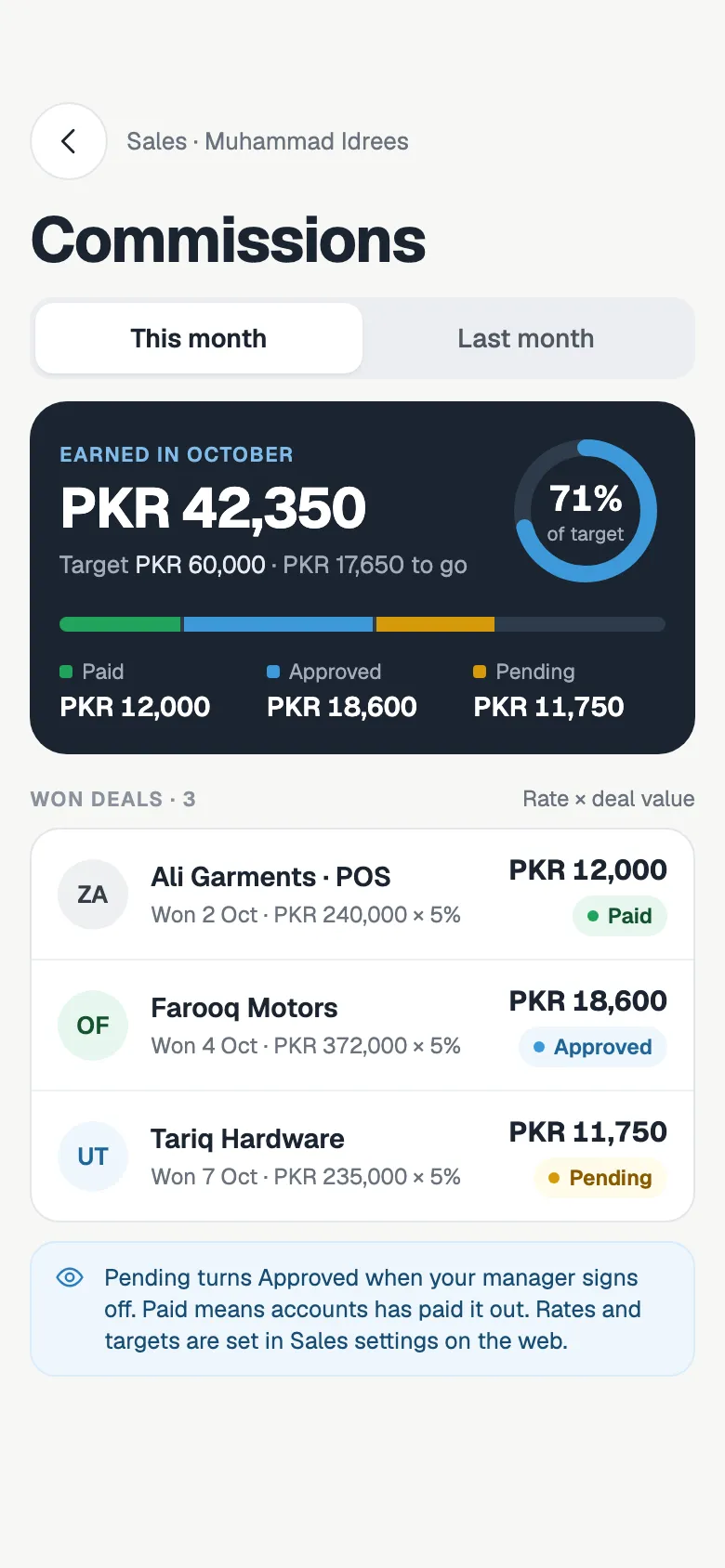
Each rep sees what they have earned this month, what is still pending and which deals it came from. Nobody has to rebuild a commission sheet at month end, and nobody argues about the numbers.
- Commission is calculated when a deal is won
- Pending until it is confirmed, then approved, then paid
- Rates, caps and the manager's share set in Sales settings
- A refund or churn inside the clawback window you set reverses the commission
Built for teams that sell on WhatsApp and the phone
Pipelines and deals
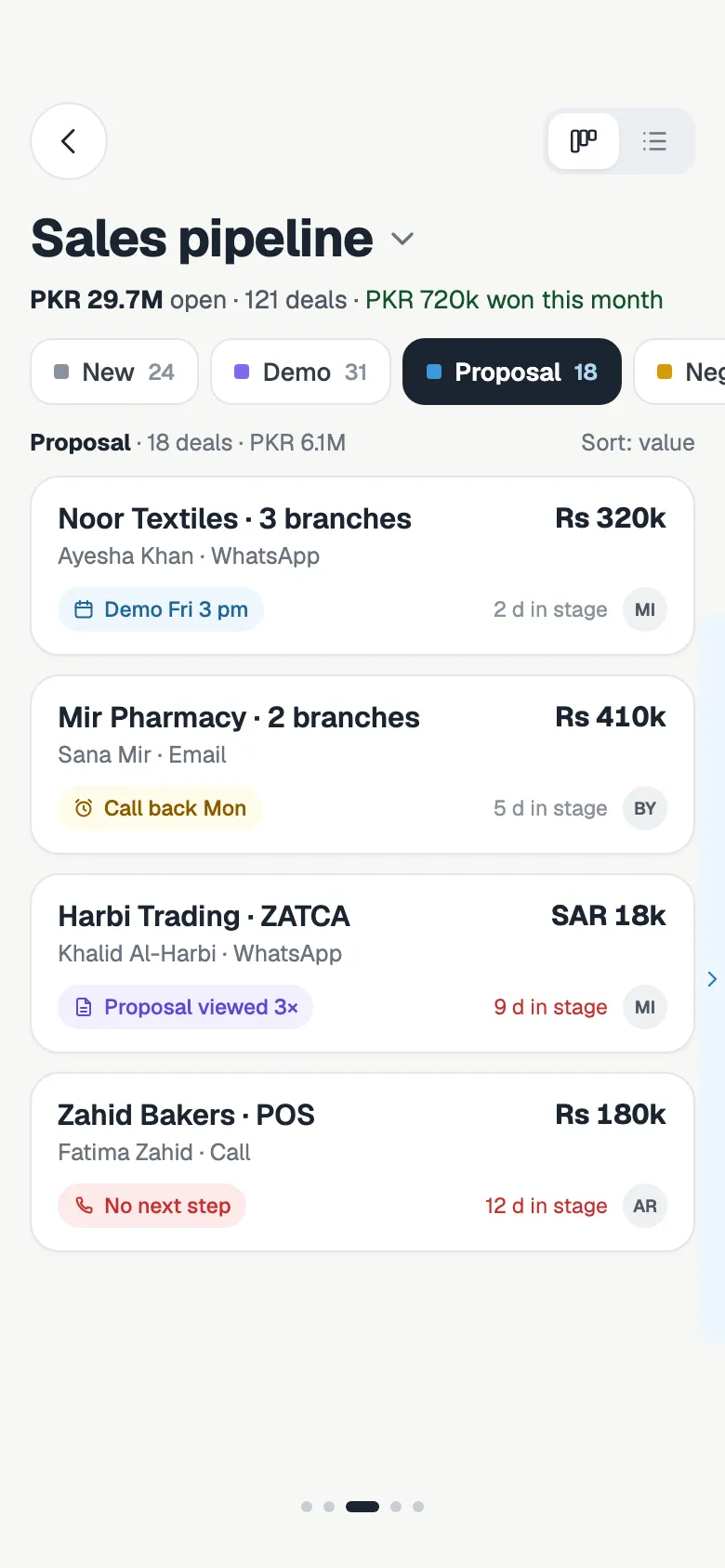
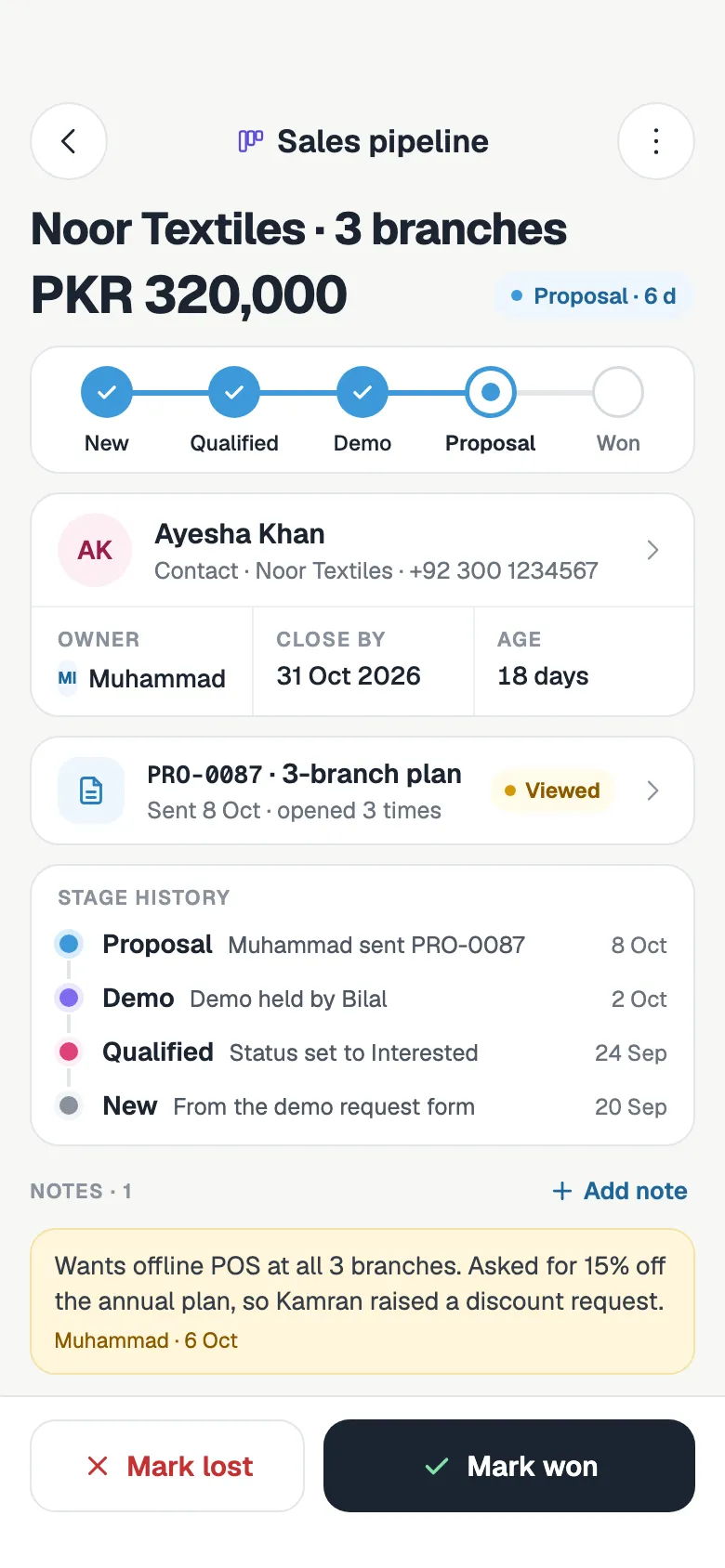
Drag deals between stages and see each deal's value and contact on the board.
AI to human handoff
When the AI agent needs a person, the chat goes into the sales queue. The rep who takes it pauses the AI.
Calling from the CRM
Call from the browser, record the call and log the outcome without switching apps.
Won deals tracked to go-live
Follow each won deal through installed, trained and support handover until the customer is live.
Leads from your ads
Facebook and Instagram lead ads arrive as contacts and can be shared out to your reps the moment they land.
WhatsApp on every lead
Reps message leads on WhatsApp from the CRM, and every chat stays on the contact.
Sales CRM, answered
What is a sales CRM?
A sales CRM keeps every lead, conversation and deal in one place so your team knows who to contact and what happens next. FOXAF adds the daily work on top: a call-next queue for each rep, automatic lead assignment, cadences and call outcomes that update the pipeline.
How does FOXAF decide which rep gets a new lead?
Only reps marked available can get a new lead automatically. By default the one with the fewest open leads gets it, or you can switch to plain round robin, where whoever has waited longest goes next. Each rep can have a lead cap and rules by tag or business type, and a rep in manual mode only gets leads a person gives them.
Is FOXAF a lead management system?
Yes. Leads from Facebook lead ads, website forms, WhatsApp and live chat become contacts that can carry a lead status, an owner and a deal. Statuses can move the deal to a pipeline stage or start a workflow, and the lead's history stays on the contact.
What is My Day?
My Day is each rep's queue for the day. It puts hot leads and live chats first, then chats the AI agent handed over, callbacks that are due, trials, engaged follow-ups and cold leads. The rep calls or messages from the card and logs the outcome.
What happens when a rep logs a call outcome?
FOXAF does the follow-up admin. Interested moves the deal and books a follow-up, a demo or trial moves it to the matching stage, a pricing question starts the objection cadence and can raise a discount request, and not interested marks the deal lost and brings the lead back later.
Can it calculate sales commissions?
Yes. Commission is worked out when a deal is won and stays pending until it is confirmed, then approved and paid. You set the rates, caps and the manager's share in Sales settings, and a refund inside the clawback window reverses it.
What can a sales manager see?
Who is available, on a call or away, each rep's calls and won deals against target, and everything waiting on a decision: discount and refund approvals and chats the AI agent handed to a person. The owner report shows where leads drop out and which sources bring sales.
Can reps call and WhatsApp leads from the CRM?
Yes. Reps call from the browser and log the outcome when they hang up, and WhatsApp chats open from the same screen. Every call and message stays on the lead's contact, so whoever picks it up next sees the whole history.
Part of one CRM, not another app to log into
Give every rep a full day of the right calls
Add your team, set how leads are shared, and let My Day line up the calls.