What Is a WhatsApp CRM? The 2026 Guide
A WhatsApp CRM manages your sales and support conversations on WhatsApp inside a real CRM — pipelines, automations and a shared inbox. Here's how it works.
What list item Is a WhatsApp CRM? The 2026 Guide
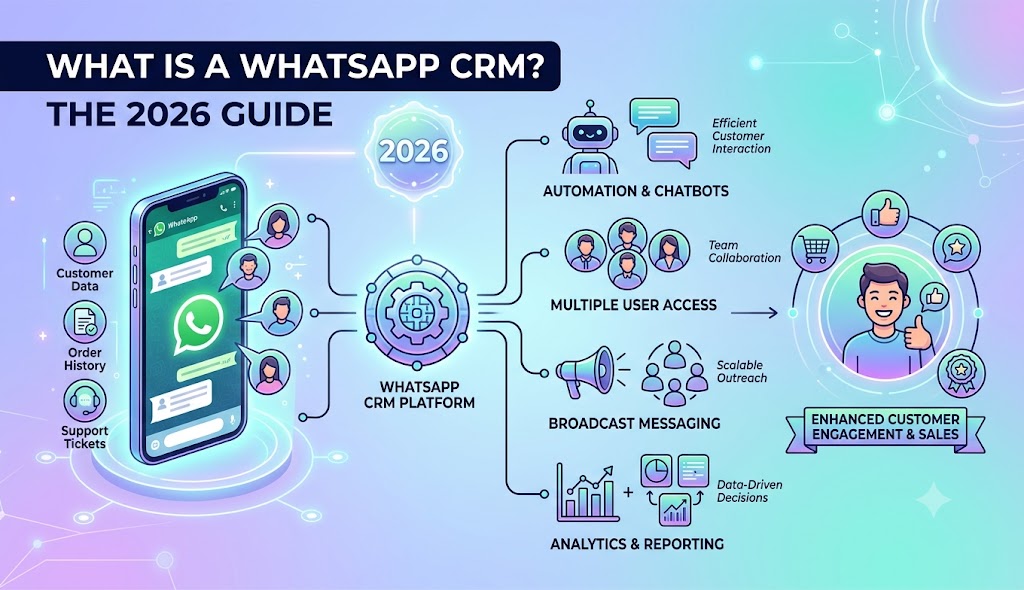
A WhatsApp CRM is a customer relationship management tool that connects directly to WhatsApp, so every chat with a lead or customer is captured, organised in a shared team inbox, and pushed through a real sales pipeline — with automations, contact records, and reporting on top. In short: it turns WhatsApp from a personal chat app into a measurable sales and support channel.
Why WhatsApp needs a CRM
The regular WhatsApp Business app works for one person with a phone. It breaks the moment you have a team: chats live on one device, nobody can see who replied, leads get lost, and there's no pipeline, no automation, and no reporting. A WhatsApp CRM fixes that by sitting between WhatsApp and your business and giving every conversation structure.
How a WhatsApp CRM works
- You connect WhatsApp — either by scanning a QR code (your existing number) or through the official WhatsApp Cloud API for higher volume and multiple agents.
- Conversations flow into a shared inbox — the whole team works from one place, with assignment, internal notes, and tags.
- Each contact becomes a record — name, number, history, deal stage, and custom fields.
- Deals move through a pipeline — drag a lead from "New" to "Qualified" to "Won," just like a sales CRM.
- Automations do the repetitive work — welcome messages, follow-ups, reminders, and replies trigger automatically.
What a good WhatsApp CRM does
- Shared team inbox with assignment and collision detection
- Sales pipeline for WhatsApp leads
- Broadcasts and campaigns (compliant, opt-in based)
- Automated follow-ups and chatbots so no lead goes cold
- Templates and quick replies for fast, consistent answers
- Contact management with tags, notes, and custom fields
- Reporting — response times, conversion, agent performance
WhatsApp CRM vs a regular CRM
A regular CRM (think a traditional sales tool) treats WhatsApp as an afterthought — usually a clunky add-on. A WhatsApp-native CRM is built around the channel: the inbox, automations, and pipeline are all designed for chat-first selling. If most of your customers reach you on WhatsApp — as they do across Pakistan, South Asia, the Middle East and Latin America — native beats bolted-on every time.
QR connection vs Cloud API — which do you need?
- QR (your existing number): fastest to start, great for small teams and getting going today.
- Cloud API (official): needed for higher message volume, multiple agents on one number, the verified green tick, and large broadcasts.
A capable WhatsApp CRM supports both in one inbox, so you can start on QR and scale to the API without switching tools. (Foxaf does exactly this — see the WhatsApp CRM page.)
Who needs a WhatsApp CRM?
- eCommerce / COD businesses confirming orders and cutting return rates
- Coaches, agencies and local services that close deals in conversation
- Any team where two or more people answer WhatsApp and leads currently slip through the cracks
All-in-one vs a WhatsApp inbox alone
Many "WhatsApp CRMs" are just a shared inbox. The bigger win is an all-in-one platform where WhatsApp sits alongside pipelines, funnels, booking, forms, and campaigns — so you replace several tools with one. That's the difference between organising chats and actually running your whole sales engine. Foxaf is built as an all-in-one, WhatsApp-native, AI-first CRM — compare it to the alternatives on our Foxaf vs GoHighLevel page.
How to choose one
Look for: native WhatsApp support (QR and API), a genuine pipeline (not just an inbox), automations, fair pricing with no per-contact penalties, and relevance to your market (local pricing and payment realities matter). See Foxaf pricing for an example of flat, no-per-contact pricing.
Ready to turn WhatsApp into a real sales channel? Explore the Foxaf WhatsApp CRM.
Frequently asked questions
Is a WhatsApp CRM the same as the WhatsApp Business app?
No. The Business app is a single-user phone app. A WhatsApp CRM is multi-user software that adds a shared inbox, pipeline, automations, and reporting on top of WhatsApp.
Do I need the WhatsApp Business API to use a WhatsApp CRM?
Not always. Many WhatsApp CRMs (including Foxaf) let you start by scanning a QR code with your existing number, then upgrade to the official Cloud API when you need more volume or agents.
Will using a WhatsApp CRM get my number banned?
Not if you follow WhatsApp's rules: message people who opted in, avoid spam, and use approved templates for broadcasts. A good CRM helps you stay compliant.
How much does a WhatsApp CRM cost?
It varies. Some charge per contact, which gets expensive fast. Foxaf uses flat pricing starting at $47/month with no per-contact fees — see pricing.