
WhatsApp automation that follows up for you
FOXAF answers, reminds and follows up on WhatsApp when something happens in your business: a form comes in, a deal moves, an invoice goes overdue, a cart is left behind. Build it once in a visual workflow builder, with no code, and every customer gets the same timely follow-up.
- About 40 triggers from your CRM, store and inbox
- WhatsApp, email and SMS in one flow
- Waits, branches and send windows
- Keyword auto-replies and AI agents
Workflows and auto-replies are on every plan: 1 active workflow on Free, 10 on Starter ($29/month), 50 on Pro, 100 on Plus. 14-day free trial.
Auto-replies and away messages
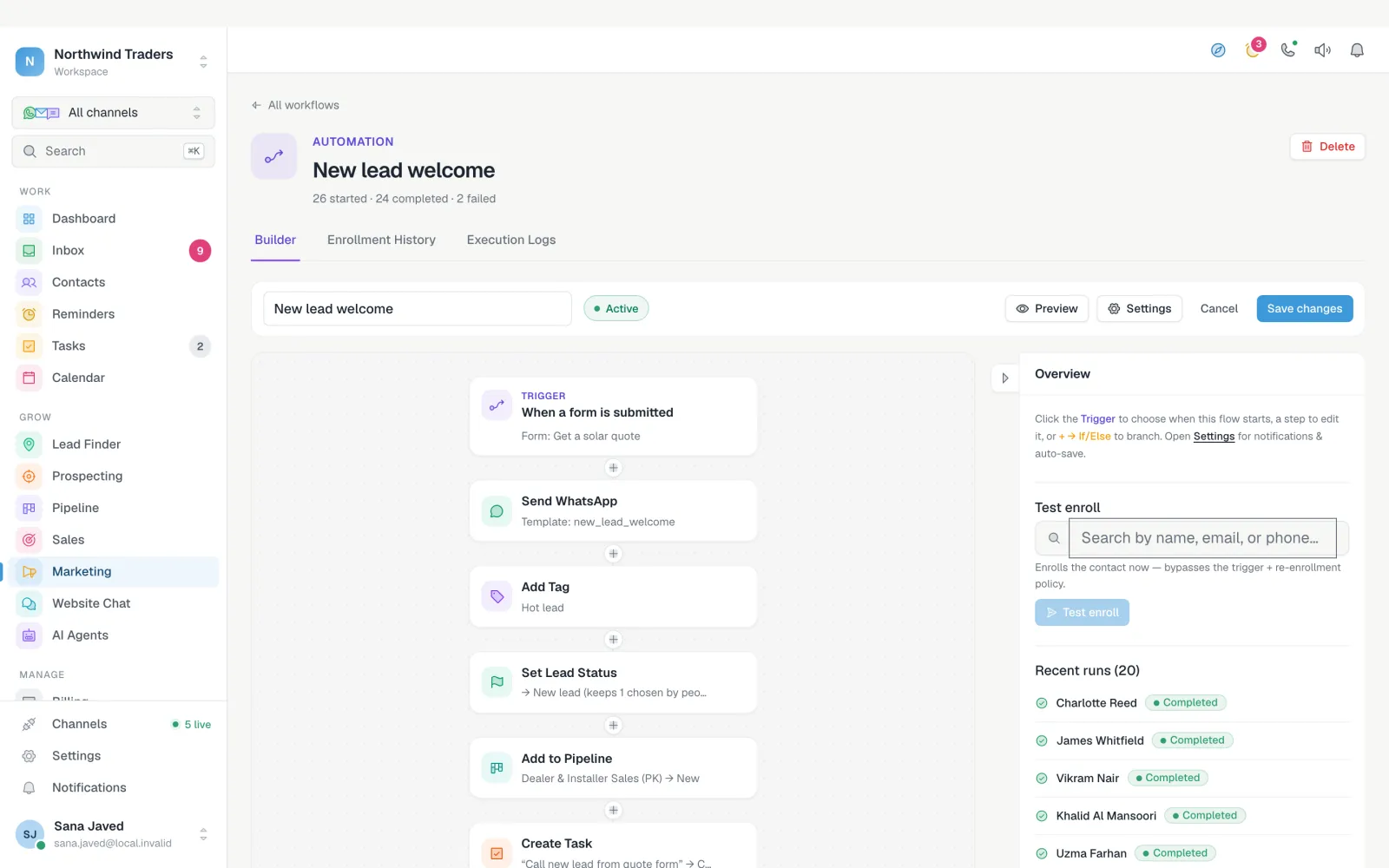
A WhatsApp auto reply answers the questions you get ten times a day, the moment they arrive. Prices, opening hours, where to find you: write the answer once and FOXAF sends it whenever the keyword comes in.
- Answer any message, an exact keyword, a message that contains or starts with a word, or a pattern
- Reply when nobody on the team has answered after a set number of minutes
- Run only on the days and hours you choose, such as overnight as an away message
- Send a text or an approved template, add a tag, start a workflow or pause the AI agent
- Set per channel: WhatsApp, SMS, website chat or email
Workflows triggered by forms, tags and deals
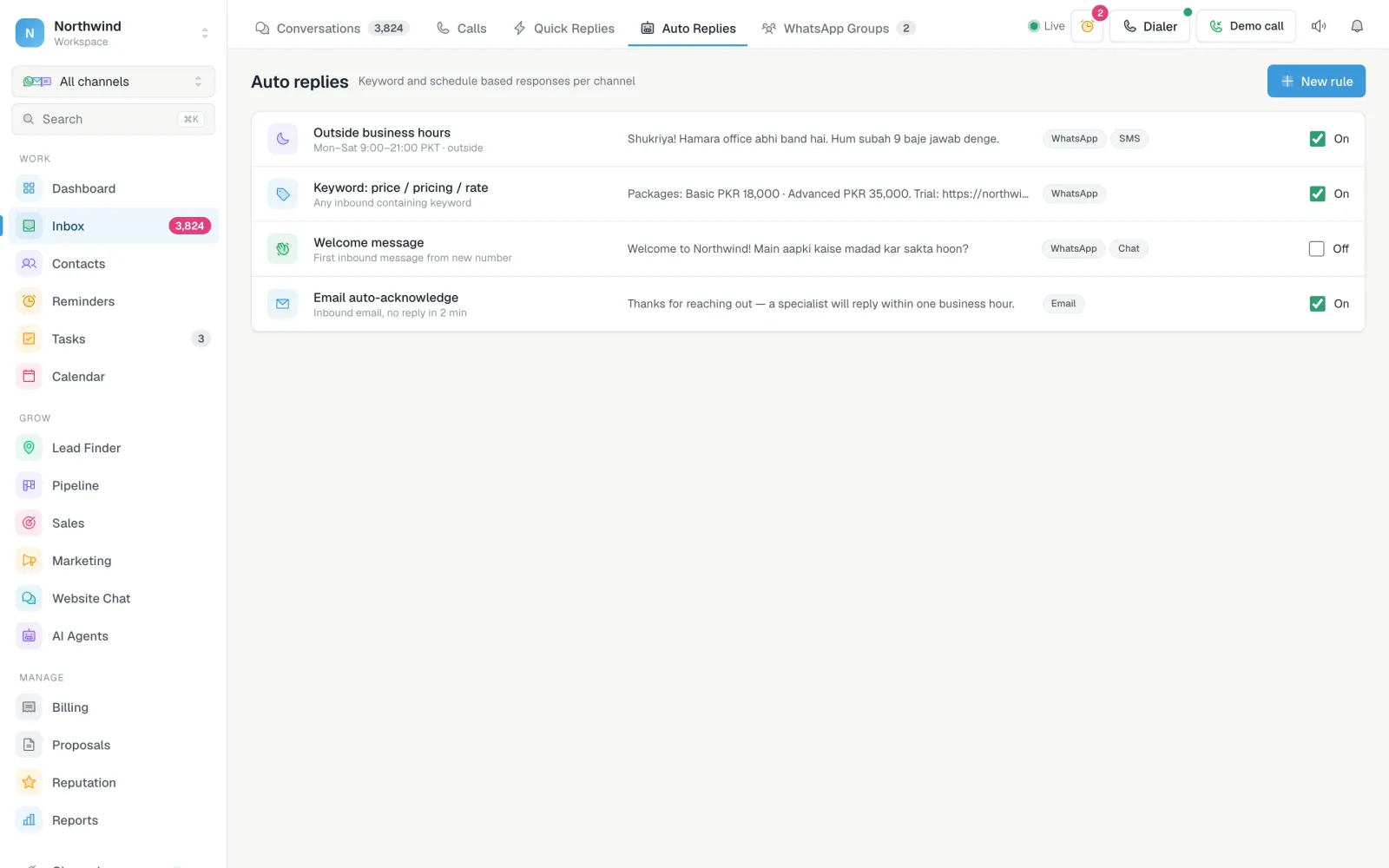
A workflow starts on an event and runs a chain of steps for each contact. A new lead fills in your form: FOXAF sends a WhatsApp welcome, tags them, sets their lead status, adds them to your pipeline and creates a call task for sales. A deal reaches Proposal sent: FOXAF nudges after two days and tells the owner if there is still no reply.
Messages are personalised from the contact's fields, your custom values and the deal, order, quote or invoice that started the workflow.
What can start a workflow, and what it can do
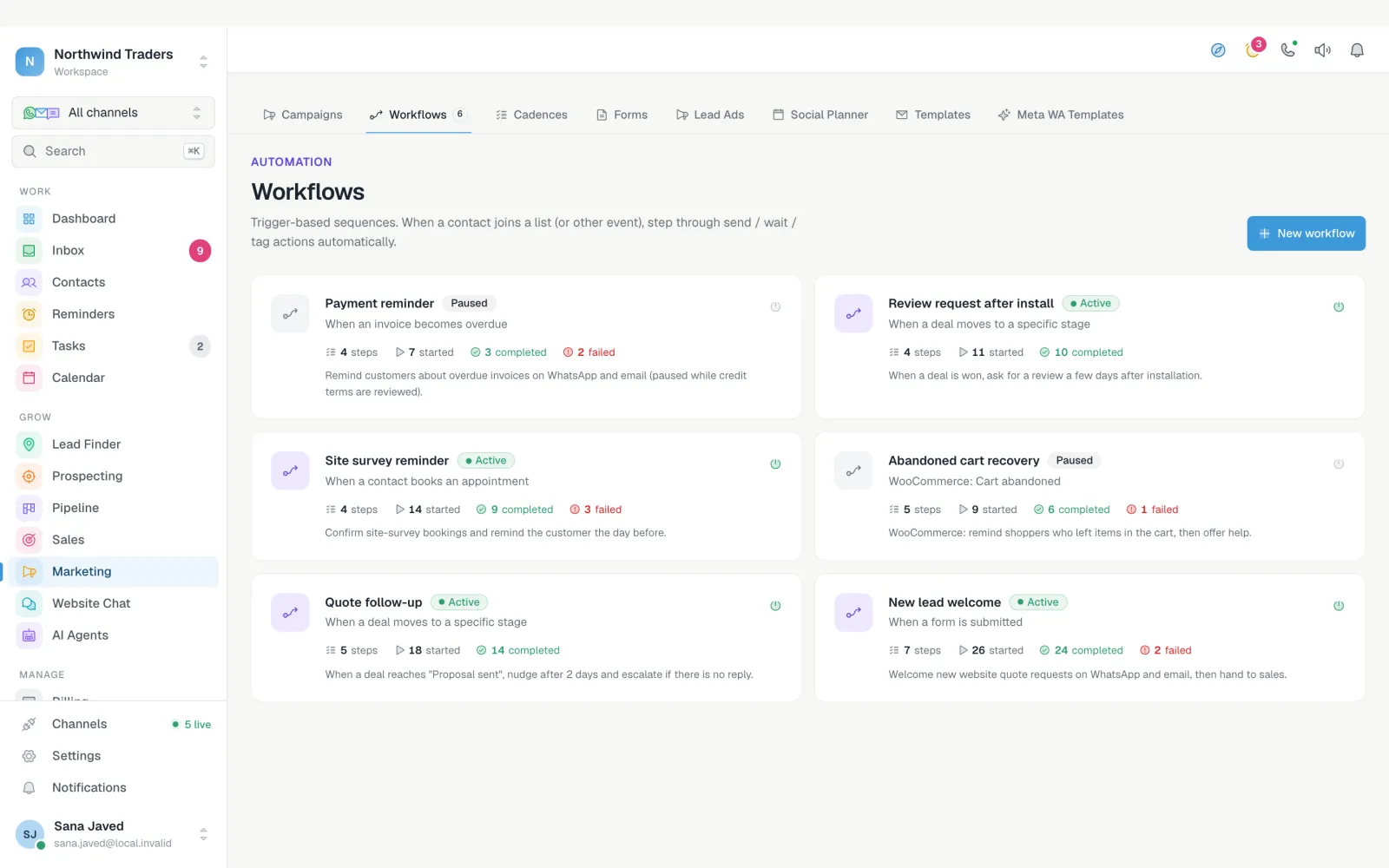
CRM automation is only as good as the events it can hear. FOXAF workflows listen to your contacts, inbox, sales, billing and store.
Triggers
Contact created with a source · added to a list · tag added · a field changes
Inbound message on any channel, with keyword or channel filters · email opened · link clicked
Form submitted · appointment booked · appointment cancelled
Deal moves to a stage · proposal opened, accepted or declined
Quote sent, opened, accepted, declined or expired · invoice sent, part paid, paid or overdue · payment refunded
WooCommerce order placed, paid or changed · cart abandoned or recovered · back in stock · inactive customer
iCargos shipment status changed
Actions
WhatsApp message or template · email · SMS · review request · AI voice call
Add or remove a tag or list · update a field · set the lead status · unsubscribe
Add to a pipeline stage · create a task for a person or department · close the conversation
Wait a set time · wait until they reply or open · if/else branches · enrol in another workflow
Invoice from an accepted quote · invoice reminder · change a WooCommerce order status · add an order note · create a coupon
WooCommerce workflows and AI voice calls are on Pro and up. Proposals, quotes and invoices are on Starter and up.
Drip sequences and reminders
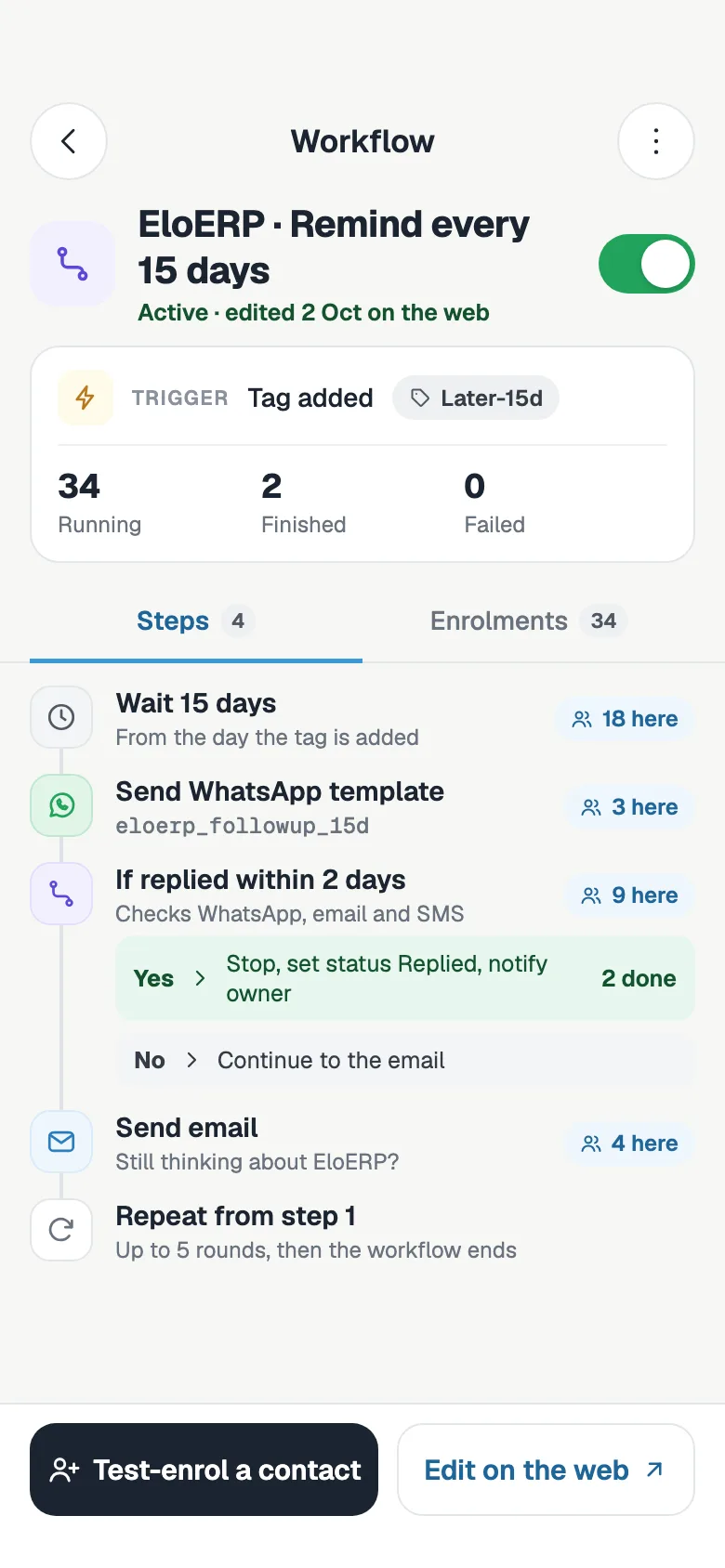
Most leads need more than one message. A drip sequence sends a WhatsApp template, waits, checks whether they replied, and only then sends the next one. Send people who answer down a different branch, with a task for a person to call them.
- Wait minutes, hours or days between steps
- Wait until the contact replies or opens an email, for up to a set time
- If/else branches on a reply or any contact condition
- Hand the contact to another workflow when the sequence ends
- Send windows in each customer's own time zone, so nothing goes out at night
AI agents working alongside your automation
Workflows send the messages you planned. AI agents handle the replies you could not plan for.
AI replies on WhatsApp
From Starter, an AI agent answers incoming chats from your knowledge base, reads images and transcribes voice notes.
Hand over to a person
When a chat needs a person, the agent hands it over. An auto-reply rule can also pause the AI on a keyword.
AI voice call as a step
On Pro and up, a workflow step can place an AI voice call, with the call logged on the contact.
WhatsApp Business app vs API automation
The WhatsApp Business app has a greeting message, an away message and quick replies. That is enough for one person on one phone. It cannot follow up after three days, react to a paid invoice or share the work across a team.
Connect your number to FOXAF by QR code, or through Meta's signup with the option to keep using the app on the same number, and you get keyword auto-replies, workflows, AI agents and a shared inbox on top. On the official API, messages sent more than 24 hours after the customer last wrote use approved templates, which you choose in each step.
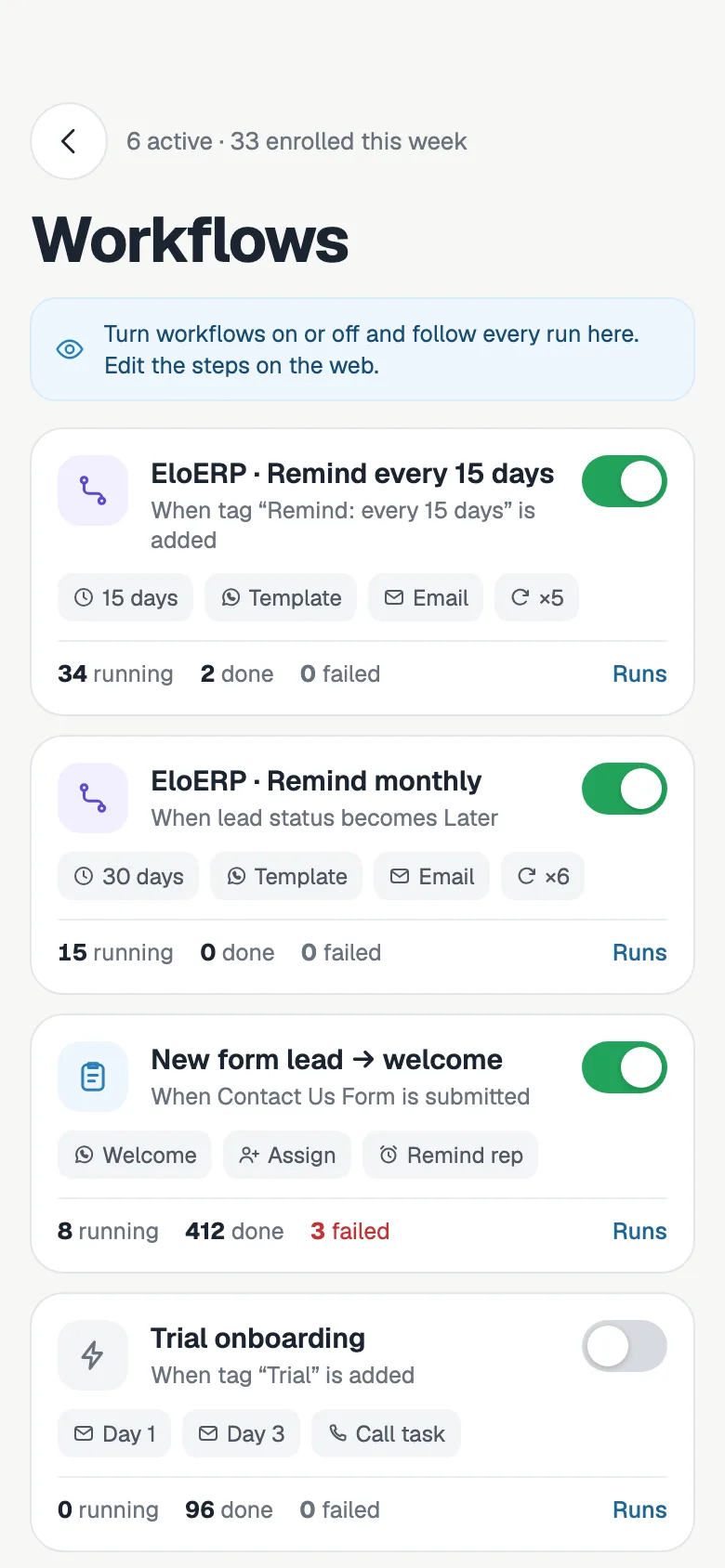
Automate WhatsApp in four steps
- Step 1
Pick a trigger
Choose what starts the workflow: a form, a tag, a deal stage, an order, an inbound keyword.
- Step 2
Add the steps
Send WhatsApp, wait, branch, tag, add to the pipeline or create a task, in the order you want.
- Step 3
Set the send window
Choose the hours messages may go out, in each customer's time zone, and who gets notified.
- Step 4
Test and switch on
Test-enrol one contact, check the log, then switch the workflow on and watch the runs.
A WhatsApp automation tool inside your CRM
Run history and logs
Every run, step by step, for every contact: what was sent, what waited and what failed.
Snapshots
Install a full business setup in one click: workflows, WhatsApp templates, tags, fields and custom values.
Starter store workflows
On Pro, ready-made WooCommerce workflows for abandoned carts, cash-on-delivery confirmation, reviews and win-back.
Failure alerts
Choose who gets an email when a run fails, so a broken flow does not go unnoticed.
Re-enrolment rules
Decide whether a contact can go through the same workflow again, and when.
Webhooks
Send workflow data to your own systems with a webhook step.
WhatsApp automation, answered
How can I automate my WhatsApp messages?
In FOXAF you build a workflow: pick what starts it, such as a form, a new tag or a deal moving stage, then add steps like send a WhatsApp template, wait two days and branch on whether they replied. Set the hours it may send and switch it on. For instant answers to incoming messages, add an auto-reply rule.
Is WhatsApp automation free?
Workflows and auto-replies are on every FOXAF plan, including Free with 1 active workflow. Starter ($29 a month) runs 10, Pro ($49) 50 and Plus ($99) 100. On the Cloud API, Meta charges for template messages your workflows send, by category and country.
How do I set up a WhatsApp auto reply for my business?
Create an auto-reply rule. It can answer any message, a message that matches or contains a keyword, or a chat nobody has answered after a number of minutes, and it can run only on the days and hours you set, such as overnight as an away message. The rule sends a text or template, adds a tag, starts a workflow or pauses the AI agent.
What can start a WhatsApp workflow?
New contacts, tags, lists and field changes; incoming messages, with keyword or channel filters; form submissions and bookings; deals moving stage; proposal, quote and invoice events; WooCommerce orders and abandoned carts; and iCargos shipment updates.
Will automated messages go out at night?
Not if you set a send window. A workflow can be limited to the hours you choose, counted in each customer's own time zone, so a message due at 2 am waits until morning.
Can I automate the WhatsApp Business app?
The app itself has a greeting, an away message and quick replies. Connect the same number to FOXAF, by QR code or through Meta's signup with the option to keep using the app, and you get keyword auto-replies, workflows, AI agents and a shared inbox on top.
Can an AI agent reply inside my WhatsApp automation?
Yes. AI agents (from Starter) answer incoming WhatsApp chats from your knowledge base and hand over to a person when they should. Auto-reply rules can pause the agent, and on Pro a workflow step can place an AI voice call.
How do I check what a workflow did?
Each workflow has a run history and a step-by-step log for every contact, with what was sent, what waited and what failed. You can test-enrol one contact before switching it on.
Part of one CRM, not another app to log into
Let WhatsApp follow up while you work
Start with one workflow on the Free plan, or try every plan free for 14 days.