
Offer or sale
MarketingHi {{1}}, our winter sale starts today. Take 20% off everything in store and online until Sunday. Show this message at the counter or use code WINTER20.
Shop nowNot interested
A 2-minute walkthrough of the unified inbox, AI agents and a WhatsApp campaign.
Book a demoLocal time zones, PKR & AED display, WhatsApp-first because that is how your customers actually talk to you.
About FOXAFImport your contacts from CSV or Excel, then connect WhatsApp by QR code or the official API.
See migration pathsSend offers, reminders and updates to thousands of opted-in customers without risking your number on a gray-market tool. FOXAF sends WhatsApp broadcasts through Meta's WhatsApp Business Platform with approved templates, at a pace you control, and every reply lands in your shared inbox.
Broadcasts are on every plan: 1 campaign a month on Free, 5 on Starter ($29/month), as many as you need on Pro and up. Cloud API numbers from Starter. 14-day free trial.
Most free bulk sender tools work by remote-controlling WhatsApp Web or the phone app. That is against WhatsApp's terms, and it is why so many numbers that use them get blocked.
On the WhatsApp Business app, a broadcast list reaches at most 256 people, and only those who saved your number receive it. On the API, recipients do not need to save your number, but they must have agreed to hear from you. That is the rule that keeps a number safe.
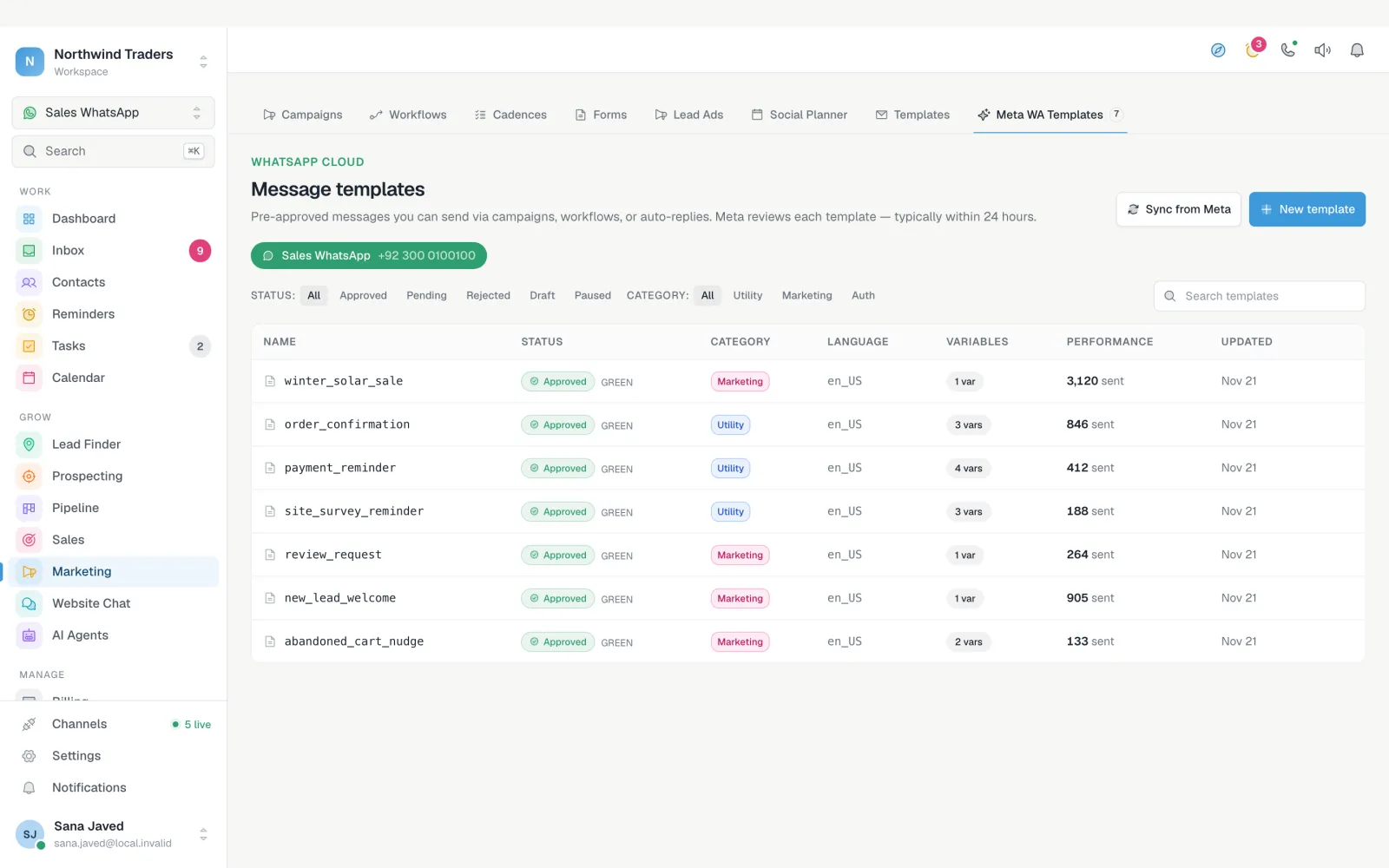
Outside the 24-hour window after a customer last wrote to you, WhatsApp only delivers messages from a template Meta has approved. FOXAF's template builder handles the format Meta expects, syncs templates you already have, and lets you pick one per campaign.
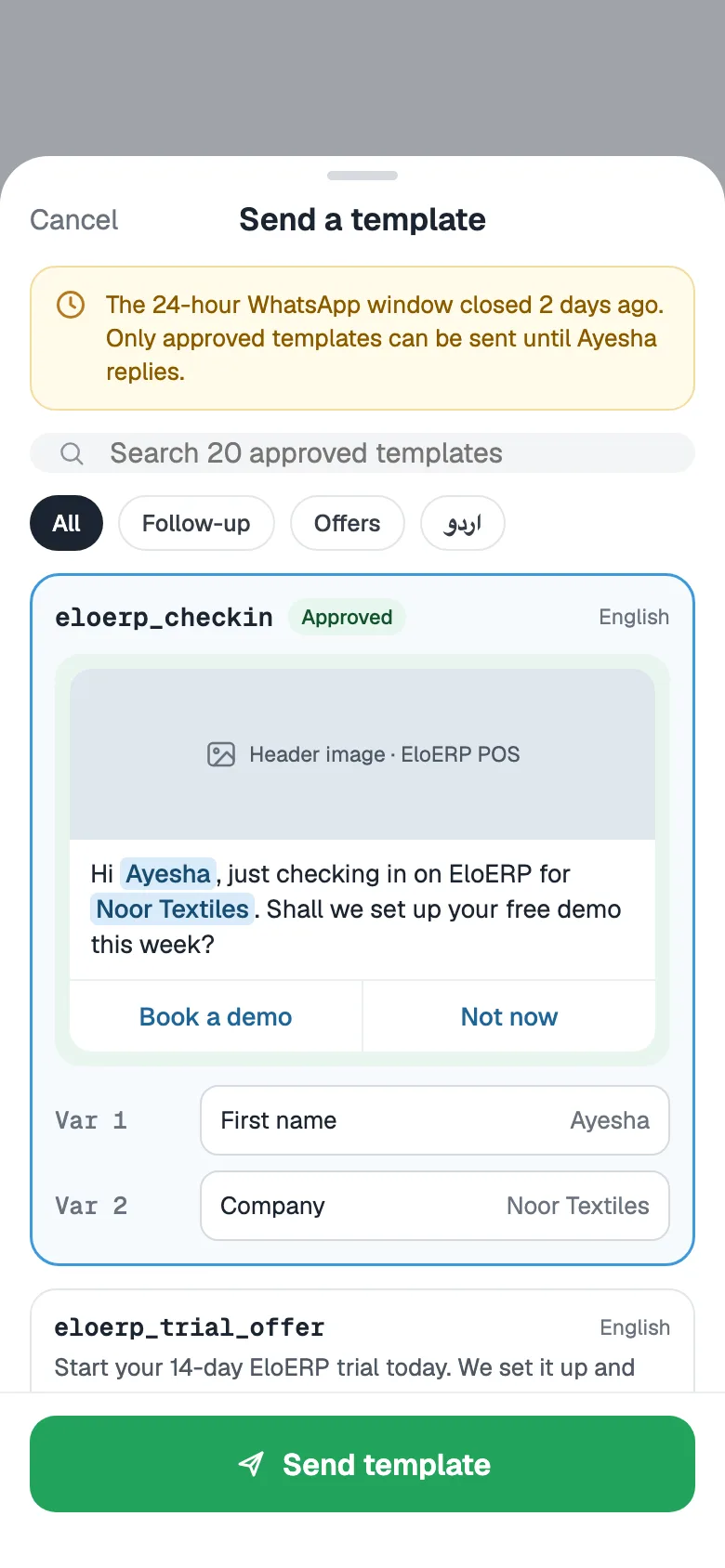
WhatsApp message marketing works when the right people get the right message. Segment by what you already know about each contact, fill in their details, and let FOXAF spread the send so your number keeps a good quality rating.
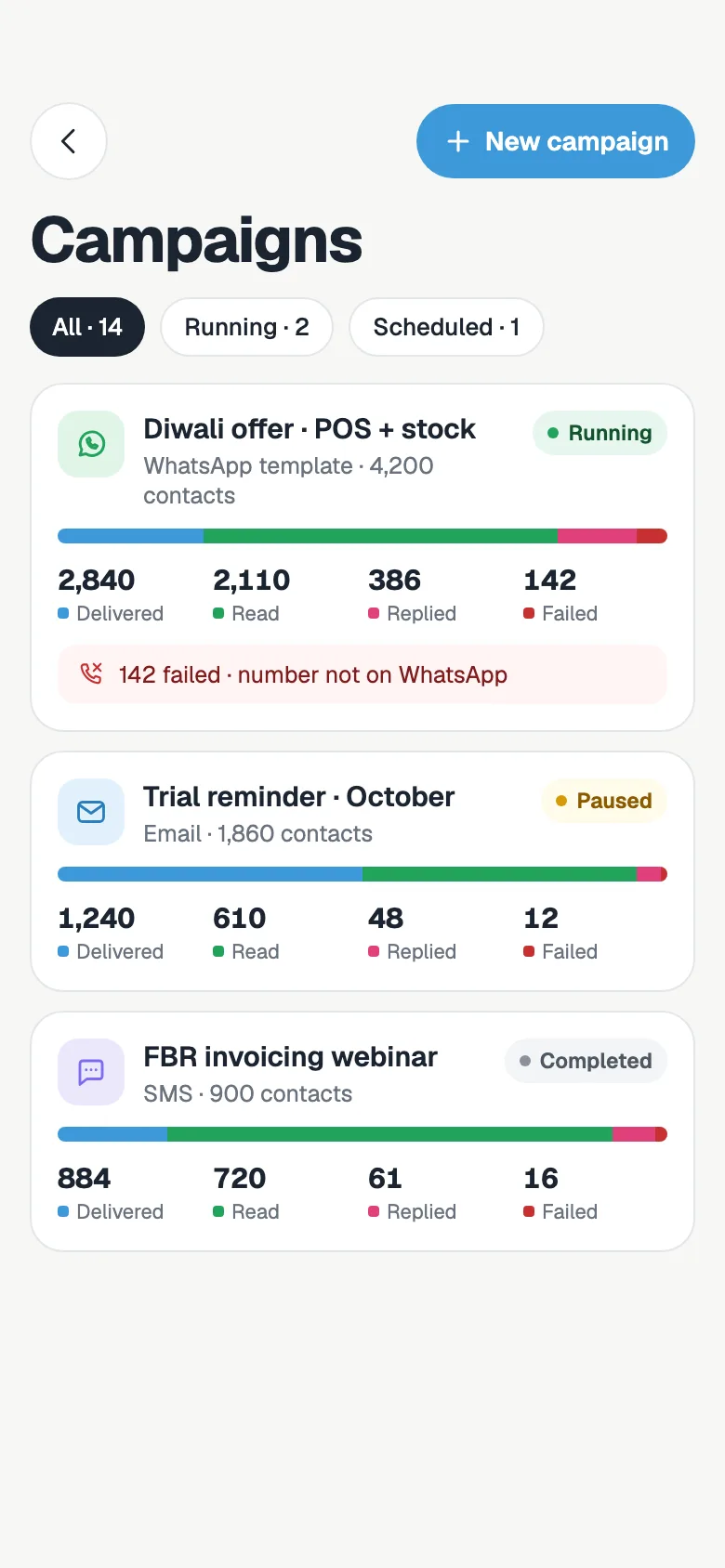
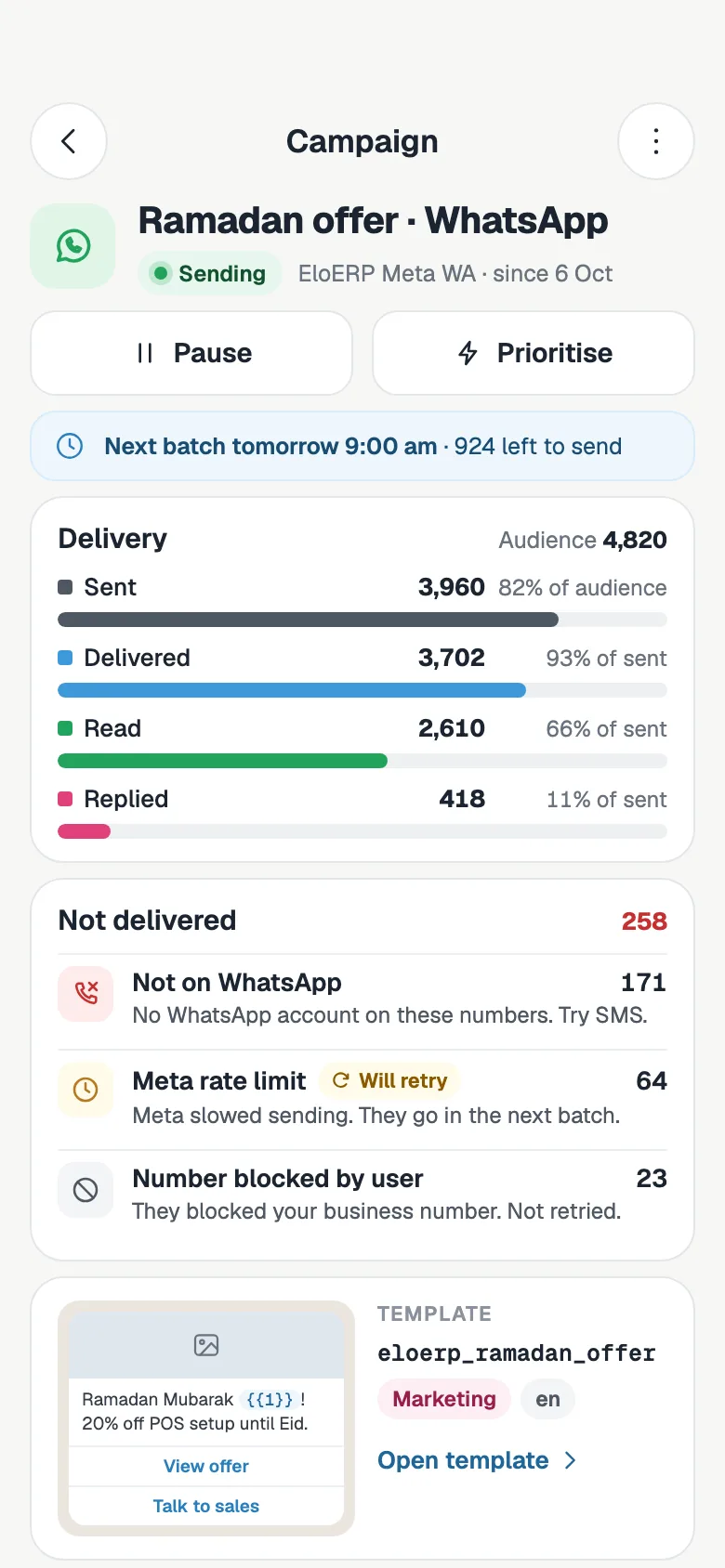
A broadcast is only useful if you can see what happened. Each campaign shows how far it got and why any message did not arrive, so you can clean the list before the next one.
Cloud API numbers send within the daily limit Meta gives them, and FOXAF shows each number's quality and tier next to it. A number connected by QR code leaves 5 to 15 seconds between messages, shows typing first and starts at 200 messages a day, which you can raise in its settings once the number is established.
For large marketing sends, use a Cloud API number. Businesses that Meta has not approved yet can start on a FOXAF-managed number and move to their own account later.
Eight broadcast messages that work for most small businesses. {{1}}, {{2}} and so on are variables FOXAF fills in for each customer. Meta reviews every template and sets its final category.
Keep marketing messages short, give one clear action and always offer a way to stop. Utility messages, such as reminders and order updates, must be about something the customer already started with you.
Connect your WhatsApp Business account with Meta's signup inside FOXAF, link a number by QR code, or start on a FOXAF-managed number.
Choose an approved template or write a new one and submit it to Meta. Fill its variables from contact fields.
Select by tag, list, filter or lead status. FOXAF counts the recipients and skips anyone who opted out.
Send now or schedule, set the batch size and window, then follow delivery, reads and replies as they come in.
Meta charges for each delivered template message, by its category (marketing, utility or authentication) and the customer's country. Marketing messages cost the most. Replies inside the 24-hour customer service window are free.
With your own WhatsApp Business account, you pay Meta directly, at Meta's rates. With a FOXAF-managed number, each message is charged to your FOXAF wallet at Meta's rate plus 10%, and FOXAF shows an estimate before the campaign sends. A number connected by QR code is not on Meta's Business Platform, so Meta does not charge per message for it.
See Meta's rates for each country and work out a monthly budget with the WhatsApp API pricing calculator.
Select contacts in the list, pick an approved template and send, without building a full campaign.
Consent is tracked per channel. Unsubscribed contacts are skipped, and free-form broadcasts get an unsubscribe line.
Quality rating, messaging tier and connection status for every number, with alerts when something changes.
Every reply opens as a conversation in the shared inbox, assigned to the right person, with the campaign beside it.
From Starter, an AI agent can answer questions that come back from a broadcast and hand hot leads to your team.
The same campaign tool sends email and SMS, so one audience can get the channel that suits it.
It depends on how it sends. Unofficial bulk senders drive WhatsApp Web or the phone app with automation, which is against WhatsApp's terms, and numbers that blast messages that way are often banned. FOXAF sends broadcasts through Meta's official WhatsApp Business Platform, with templates Meta has approved, to contacts who opted in.
Connect a WhatsApp number to FOXAF, pick an approved template, choose who gets it by tag, list, filter or lead status, and send now or schedule it. FOXAF sends in batches at the pace you set and shows sent, delivered, read, replied and failed for the campaign.
Each person gets the message in their own one-to-one chat with your business. They do not see who else received it. When they reply, the reply lands in your shared inbox as a normal conversation.
In a group, everyone sees every message and each other's numbers, and anyone can reply to all. A broadcast goes to each person privately, and replies come only to you.
On the Cloud API, Meta sets a daily limit for each number, its messaging tier, which rises as your quality rating holds up. Your FOXAF plan sets the monthly total: 1,000 on Free, 25,000 on Starter, 250,000 on Pro and 2,000,000 on Plus. A number connected by QR code starts at 200 messages a day, which you can raise in its settings.
Yes. Meta's rules require that people agreed to hear from you on WhatsApp. FOXAF tracks consent for each channel, skips anyone who unsubscribed from WhatsApp, and adds an unsubscribe line to free-form broadcast messages.
Meta charges for each delivered template message, by category and the customer's country. With your own WhatsApp Business account you pay Meta directly at Meta's rates. With a FOXAF-managed number you pay Meta's rate plus 10%, and FOXAF shows an estimate before you send. See the WhatsApp API pricing page for rates and a calculator.
Every plan, with a 14-day free trial. Free sends 1 campaign a month, Starter ($29 a month) sends 5, and Pro ($49) and up send as many as you need. Cloud API numbers come with Starter and up.
Meta's rates by country and a calculator for your monthly cost.
Follow up every broadcast reply with workflows and auto-replies.
Green tick, approved templates and Meta setup done with you.
Every reply from every channel in one queue for your team.
Connect a number, pick a template and reach your opted-in customers on WhatsApp today.