WhatsApp Auto Reply for Business: Away Messages, Examples and Rules (2026)
How WhatsApp auto replies work on the Business app and the API, when one needs a template, what Meta says about AI replies, and 12 ready messages.
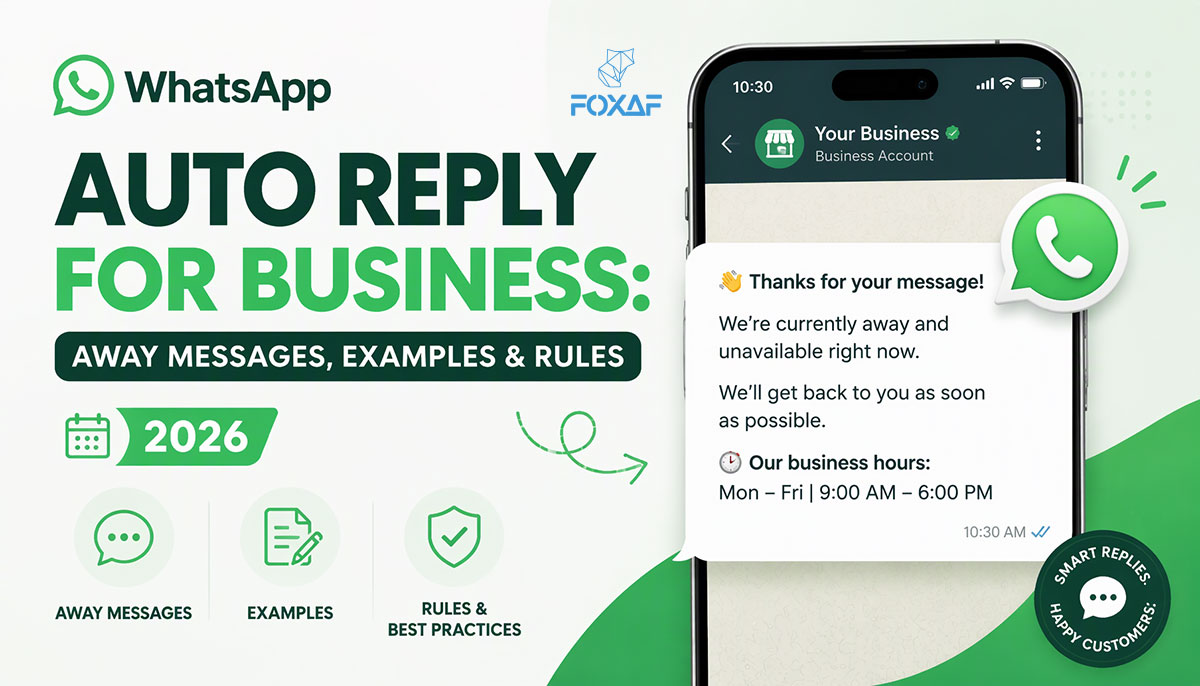
Short answer: A WhatsApp auto reply is a message your business sends automatically when a customer writes in. On the WhatsApp Business app you get a greeting message, an away message and quick replies. On the WhatsApp Business API, a CRM sends the auto reply for you and can do much more: reply by keyword, by business hours, or with an AI agent, then hand the chat to a person. The rule that matters: replying to a customer who just messaged you needs no template, but starting a conversation nobody asked for does.
This guide explains both options, what Meta's rules mean for an automatic reply (including an AI one), the mistakes that make auto replies annoying, and 12 copy-ready messages in English and Roman Urdu.
WhatsApp auto replies at a glance
| You want to... | WhatsApp Business app | WhatsApp Business API + a CRM |
|---|---|---|
| Welcome a new customer | Greeting message | Greeting or keyword reply, per number |
| Answer after closing time | Away message | Business-hours rule, per number or team |
| Answer common questions | Quick replies (typed by a person) | Automatic keyword replies, or an AI agent |
| Hand the chat to a person | Not needed: one person reads everything | Route to a teammate or department, AI steps back |
| Use more than one phone or agent | Limited | Many agents on one number in a shared inbox |
| Message someone who hasn't written to you | Normal chat | Approved template + opt-in only |
What is a WhatsApp auto reply?
An auto reply is any message that goes out without a person typing it. Businesses use them for three jobs:
- Acknowledge. "Thanks, we got your message." The customer knows they are not shouting into the void.
- Set expectations. "We're closed now and open again at 10 am." The customer knows when to expect a real answer.
- Move the chat forward. Ask the one question a person would ask anyway (order number, city, what they need), share a catalogue link, or answer a simple question outright.
A good auto reply does at least two of these. A bad one does none and just delays the human answer.
Option 1: auto replies on the WhatsApp Business app
The free WhatsApp Business app has three built-in tools. They live in the app's business tools section. Menus move between app versions, so follow the WhatsApp Help Center for the current steps.
Greeting message
Sent automatically when a customer messages your business, so first-time contacts get an instant hello. WhatsApp decides when it fires (it isn't sent on every message), and the Help Center explains the current rules. Use it to say who you are and what to send: "Share your order number and we'll check it."
Away message
Sent automatically when you are not available, so a customer who writes after closing still hears back. The app's settings control when it is sent, and the Help Center explains the current options. This is the one most businesses need, because many chats arrive when the shop is closed.
Quick replies
Saved messages a person sends with a shortcut. They are not automatic: someone still has to be in the chat. They save typing on the answers you give twenty times a day (prices, delivery areas, bank details).
Where the app runs out
The app is built for a small team working one phone. Once several people need to answer the same number, you want replies to depend on what the customer wrote, or you want an AI to handle first replies, you need the WhatsApp Business API through a provider. The WhatsApp Business API page explains how that access works.
Option 2: auto replies on the WhatsApp Business API
The API has no "away message" button. Your CRM or provider sends the automatic reply, which means you set the rules. The common ones:
- Keyword replies. The customer writes price, location or track and gets the matching answer instantly.
- Business-hours replies. Different messages in and out of hours, per number or per team. Useful if sales and support keep different hours.
- First-reply-and-route. The auto reply asks one question ("Is this about a new order or an existing one?"), then the chat goes to the right person.
- AI agent replies. An AI answers from the facts you give it and hands over when it should (next section).
- Hand-off rules. The automation stops the moment a person replies, so the customer never gets a bot message in the middle of a human conversation.
In FOXAF, AI agents can be paired with instant keyword auto-responders for FAQs and office hours, so simple questions get an instant answer and the rest go to the agent or your team. Every conversation, automated or not, lands in the shared inbox, where you can assign it to a teammate or a department.
Can a WhatsApp auto reply be AI?
Yes, if it serves your own customers. Meta's terms for the WhatsApp Business Platform restrict AI providers whose AI is the "primary (rather than incidental or ancillary) functionality" being offered. That targets general-purpose AI assistants offered to the public over WhatsApp. A business using AI to answer questions about its own orders, products and bookings is the incidental case. Read Meta's terms yourself, and ask your provider how its AI fits them. We covered the background in what's still allowed for WhatsApp chatbots in 2026.
Rules that keep an AI auto reply useful:
- Give it your facts, and only your facts. Prices, delivery areas, opening hours, policies. It should not guess.
- Tell it what it must never promise. Refunds, discounts, delivery dates, legal or account matters go to a person.
- Always offer a human. "Type AGENT to talk to our team." Then make sure someone picks it up.
- Stop when a person replies. Two voices in one chat confuses everyone.
- Test it on your own past chats before switching it on, in the language your customers actually write in.
FOXAF's AI agents work this way: you write the instructions, set handoff keywords such as speak to a human or refund, and the AI pauses on a chat as soon as a teammate replies. It won't invent answers on pricing, refunds, legal or account specifics; it says a person will follow up instead. There is a test playground to try it on any message before it goes live. For when to use AI and when to use a person, see WhatsApp chatbot vs human agent.
When does an auto reply need a template?
On the official API, Meta's rule is simple. When a customer messages you, a 24-hour customer service window opens, and it resets every time they message again. Meta's pricing page puts it plainly: businesses "can only send non-template messages to users when this window is open".
So:
| Situation | Template needed? |
|---|---|
| Auto reply to a message the customer just sent | No. It's a normal reply inside the window |
| AI agent answering during an active chat | No, as long as the customer wrote in the last 24 hours |
| "We're open again" message the next morning, 30 hours later | Yes. The window has closed |
| Following up on a missed call or an old enquiry | Yes, and the customer must have opted in. See missed-call text-back on WhatsApp |
| Any promotional message | Yes, a Marketing template to opted-in contacts |
Meta charges for some messages, and the rules changed on 1 October 2026. Check Meta's pricing page for what applies to you; this guide doesn't quote rates.
A practical consequence: an away message that says "we'll message you tomorrow" is a promise you can only keep with a template if the customer doesn't write again. Either reply within 24 hours, or word the away message so the customer knows to message you back.
12 WhatsApp auto reply messages you can copy
Replace the bracketed parts. Keep each one short: it's read on a phone.
1. After hours (English)
Thanks for messaging [Business]. We're closed right now and open again at [10 am]. Leave your question here and our team will reply first thing.
2. After hours (Roman Urdu)
[Business] ko message karne ka shukriya. Hum abhi band hain, kal [subah 10 baje] khulenge. Apna sawal yahin likh dein, hum sab se pehle jawab denge.
3. Jumma break
We're on our Jumma break until [2:30 pm]. Your message is safe with us and we'll reply as soon as we're back.
4. Eid holidays (English)
Eid Mubarak from [Business]! We're closed from [date] to [date]. Orders placed now will be dispatched from [date]. Reply here and we'll answer when we're back.
5. Eid holidays (Roman Urdu)
[Business] ki taraf se Eid Mubarak! Hum [date] se [date] tak band hain. Abhi ke orders [date] se dispatch honge. Yahin message chhor dein, wapas aa kar jawab denge.
6. Ramadan timings
Ramadan Kareem! Our hours this month are [11 am–4 pm] and [9 pm–12 am]. Message any time and we'll reply within those hours.
7. Greeting for new customers
Hi, welcome to [Business]! To help you faster, tell us: are you asking about a new order, an existing order, or something else?
8. Greeting (Roman Urdu)
Assalam o Alaikum, [Business] mein khush aamdeed! Batayein: naya order, pehle wala order, ya kuch aur?
9. Order-status holding reply
Thanks! Please send your order number (it starts with [#]) and we'll check where your parcel is.
10. Lead capture
Thanks for your interest in [product/service]. Which city are you in, and roughly how many [units/people] do you need? We'll send you a price.
11. Busy period
We're getting a lot of messages today, so replies are a little slower than usual. You're in the queue, and a person will answer you here.
12. Hand-off to a person
Got it, I'm passing you to [our team / Sara]. They can see this whole chat, so you won't need to repeat yourself.
Avoid promising a response time you can't keep. "We'll reply in 5 minutes" sent at 2 am does more harm than no auto reply at all.
Mistakes that make auto replies annoying
- Replying to every message. A customer who sends four messages in a row should get one auto reply, not four.
- No way out. A bot that won't let the customer reach a person is worse than no bot.
- Promising a callback nobody makes. If the away message says "we'll call you", someone has to own that call. Log it as a task against the contact.
- Talking over a human. The automation must stop when a teammate joins the chat.
- Sounding like a robot in the wrong language. If your customers write in Roman Urdu, a stiff English auto reply feels cold. Offer both.
- Forgetting it exists. Holiday away messages left running into the next week tell customers you're still closed. Put an end date in your calendar.
- Automating the whole conversation too early. Start with the first reply, then hand over. Handling high-volume WhatsApp inquiries explains why that order matters.
How to set up WhatsApp auto replies in FOXAF
- Connect your number through the official WhatsApp Business API.
- Add keyword auto-responders for the questions you answer every day and for your office hours.
- Create an AI agent if you want it: write its instructions and the facts it may use, set handoff keywords, and test it in the playground before it touches a real customer.
- Decide who gets what. Route sales and support chats to the right teammate or department in the shared inbox.
- Plan the next step. Follow-ups after the window closes need templates. Automating WhatsApp follow-ups covers timing and wording.
See FOXAF pricing for the plans.
Frequently asked questions
How do I set an auto reply on WhatsApp Business?
On the WhatsApp Business app, use the greeting message and away message in the app's business tools. On the WhatsApp Business API, auto replies are set in your CRM or provider, by keyword, business hours or AI agent. The WhatsApp Help Center has the current app steps.
What is the difference between a greeting message and an away message?
A greeting message welcomes customers when they message your business. An away message tells them you're not available right now, for example outside business hours. Most businesses use both.
Can I set an auto reply for after business hours only?
Yes. On the API, your CRM sends a different reply in and out of hours, per number or team. On the Business app, the away message is the after-hours tool; the WhatsApp Help Center lists its current timing options.
Do WhatsApp auto replies need a template?
Not when they reply to a customer who messaged you in the last 24 hours: that is a normal reply inside Meta's customer service window. Messages sent after the window closes, or to people who haven't written to you, must use an approved template.
Is it allowed to use AI for WhatsApp auto replies?
Meta's terms restrict AI providers when AI is the "primary (rather than incidental or ancillary) functionality" being offered. A business using AI to answer its own customers is the incidental case. Read Meta's terms and ask your provider how its AI fits them.
How do I stop an auto reply from talking over my team?
Use a tool where the automation pauses as soon as a person replies in the chat. In FOXAF, the AI agent pauses on a conversation the moment a teammate replies, and can be resumed later.
What should a WhatsApp away message say?
Who you are, that you're away, when you'll be back, and what the customer should send in the meantime (an order number or their question). Keep it to two or three short lines.
Can I write auto replies in Urdu or Roman Urdu?
Yes. Write the message in the language your customers use. Many Pakistani businesses send English and Roman Urdu versions, or one short message that mixes both.