How to Send a Quotation on WhatsApp: Format, Template and Follow-Up
What a quotation should include, how to send it on WhatsApp as a PDF, when a follow-up needs a template, and copy-ready messages in English and Roman Urdu.
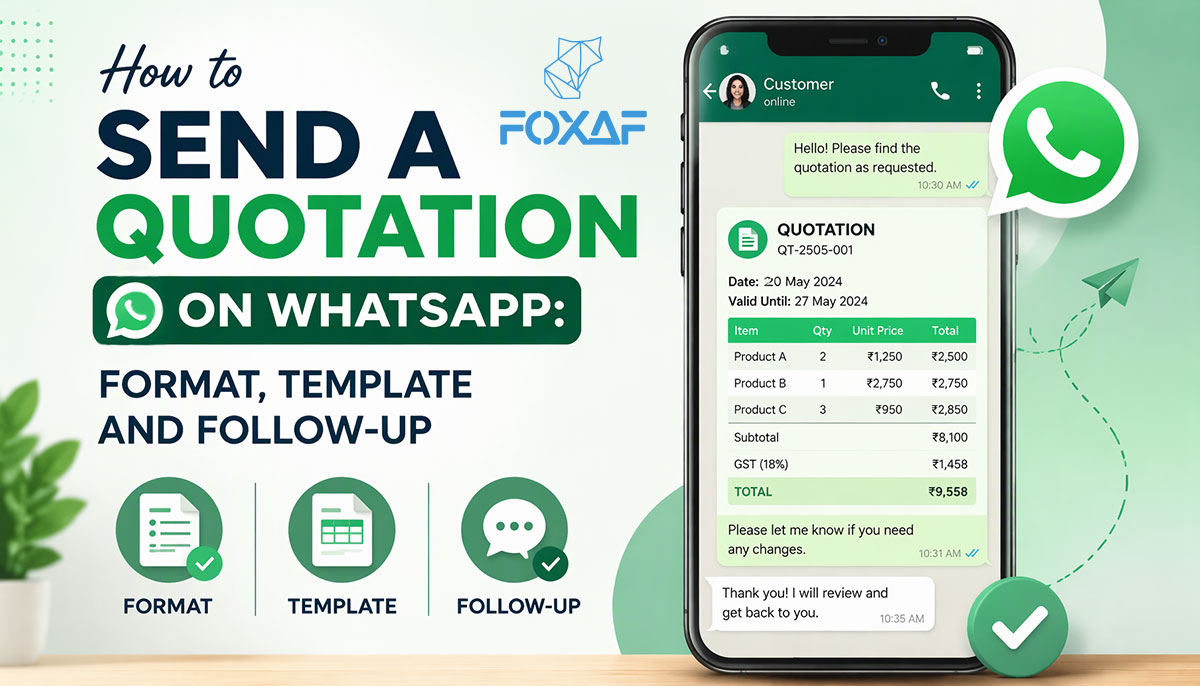
Short answer: Send the quotation as a PDF, not a screenshot, with a three-line summary in the message itself: the total, the valid-until date and what happens next. Send it from the number the customer already talks to. If they asked for the quote in the last 24 hours, a normal WhatsApp reply is fine. If the chat has gone quiet for longer, you need an approved template. A plain here's the quote you asked for fits Meta's Utility description; a nudge like 10% off if you confirm this week is Marketing.
This guide covers what a quotation should contain, how to send it on WhatsApp, a follow-up schedule that stays inside Meta's rules, and copy-ready messages in English and Roman Urdu.
Sending a quotation on WhatsApp at a glance
| Situation | What to send | WhatsApp rule |
|---|---|---|
| Customer asked for a price in the last 24 hours | PDF + short summary, as a normal reply | The 24-hour customer service window is open |
| Customer asked earlier, chat now quiet | An approved template carrying the PDF | Outside the window, only templates can be sent |
| Reminder that the quote expires soon, no offer | A plain template about their quote | Fits Meta's Utility description; Meta decides |
| Follow-up with a discount or "limited time" push | A Marketing template, to opted-in contacts only | Promotional content makes it Marketing |
| Customer said no or asked you to stop | Nothing more | Honour it and note it on the contact |
What should a quotation include?
A quotation is a written price offer. The customer can accept it, ask for changes or say no. A clear one answers every question before the customer has to ask:
- Your business details. Name, address, phone and email. Add your logo so the PDF is recognisable in a busy chat.
- The customer's details. Name, company and contact number.
- A quotation number and date. So both sides can refer to Quote Q-104 instead of the one from last week.
- A valid-until date. Prices change. Say how long this one holds.
- Itemised lines. Description, quantity, unit price and line total for each item or service.
- Discounts, shown separately. On a line or on the whole quote, so the customer sees what they're getting.
- Tax, shown separately. Label it the way your business needs (GST, sales tax or VAT) and say whether prices include it.
- The total, and the currency. Especially if you sell across borders.
- Terms. Delivery or start date, payment terms (advance, part payment, on delivery), and what's not included.
- How to accept. Reply YES, sign a link, or pay an advance. One clear action.
A quotation is not a tax invoice. If your business is registered for sales tax, the invoice you issue after the sale may have to show particular details. Ask your tax adviser what yours must carry. This guide doesn't give tax advice.
Need one quickly? The free quotation generator makes a quotation PDF in your browser with your logo, items and tax, and needs no account.
Quotation, proposal or invoice: which one do you send?
- Quotation: a price for clearly defined items or work. "Supply and fit 3 split ACs: total and valid-until." Use it when the customer already knows what they want.
- Proposal: a longer document that explains scope, options and terms, often with packages to choose from and a signature. Use it when you are selling a service or a project. See proposal software.
- Invoice: a request for payment after the customer has said yes. It should carry the same lines as the accepted quote, so nothing gets retyped. See quotes and invoices.
The order is usually: quotation (or proposal) → accepted → invoice → payment.
How to send a quotation on WhatsApp, step by step
- Reply on the same number. Send the quote from the WhatsApp number the customer contacted, not a salesperson's personal phone. The conversation, the quote and the reply then stay together.
- Attach a PDF, not a photo or screenshot. A PDF keeps the layout, can be forwarded to the person who approves the spend, and can be printed. Screenshots get cropped and are hard to read.
- Write a three-line summary in the message. Many customers read the message, not the attachment. Put the total, the valid-until date and the next step in the text.
- Give one way to accept. "Reply YES to confirm" or "Tap the link to accept." Not three options.
- Name the file sensibly. Quote-Q104-YourBusiness.pdf, not scan0045.pdf.
- Log it. Note the quote number, amount and date against the customer, so anyone on your team can answer "did we send the price?" The same applies to managing WhatsApp leads generally: if it isn't recorded, it gets lost. For a worked example, see how a garment exporter moves each buyer from sample request to "Quotation Sent" in the best CRM for WhatsApp in Lahore.
- Set a follow-up date before you close the chat. See the schedule below.
Want a customer to come back to you easily? Put a WhatsApp click-to-chat link in the footer of the quote PDF, so "questions? message us" is one tap.
When can you follow up, and does it need a template?
On the official WhatsApp Business API, two rules decide what you can send.
The 24-hour window. When a customer messages you, you can reply freely for 24 hours. After that, Meta only lets a business send an approved template. So if a customer asked for a price on Monday and you are sending the quote on Wednesday, it has to go as a template that can carry the PDF.
The template category. Meta categorises each template "based on the exact content". Its Utility description covers messages that are non-promotional and "specific to or requested by the user (clearly related to their order, account, services, or transactions)". It also says order-related messages "should not promote, recommend, upsell, or cross-sell products; include offers; or attempt to secure renewals". And templates that mix utility and marketing content are Marketing.
What that means for quotations:
| Follow-up | Likely category | Why |
|---|---|---|
| "Here is the quotation you asked for" | Fits Utility | Requested by the customer, specific to them |
| "Your quotation Q-104 is valid until 30 Nov" | Fits Utility | A plain fact about their quote, no push |
| "Still interested? Confirm today for 10% off" | Marketing | An offer, trying to secure the sale |
| "Check out our other products too" | Marketing | Cross-selling |
Meta charges for template messages, and rates depend on the category and the customer's country. See Meta's pricing page for current rates. Keep reminders plain and you keep them in the category that fits.
Don't send quote reminders as a mass broadcast to everyone who ever asked for a price. A reminder should be about one customer's quote. Broadcasts have their own rules; see WhatsApp broadcast campaigns.
A follow-up schedule that doesn't annoy people
- Same day: send the quote. If the customer has been chatting, it's inside the 24-hour window.
- Day 2 or 3: one short check, "Did the quote come through OK? Any questions on the items?" If the window has closed, use a plain template.
- A couple of days before valid-until: "Your quote is valid until [date]." No discount, no pressure.
- After it expires: close the loop. "This quote has now expired. If you'd like an updated price, just reply here." Then stop.
Three or four touches over the life of a quote is plenty. If you already automate WhatsApp follow-ups, add quote sent and quote expiring as triggers, and stop the sequence the moment the customer replies.
Copy-ready quotation messages
Replace the brackets before you use them. Template versions use {{1}}, {{2}} for the details WhatsApp fills in.
Sending the quote (inside 24 hours, normal reply)
Hi [Name], here is your quotation from [Business name]. Total: [amount]. Valid until: [date]. Delivery: [timeframe]. Reply YES to confirm, or send any changes here.
Sending the quote (template, Utility style)
Hi {{1}}, here is the quotation you asked for from [Business name], reference {{2}}. Total {{3}}, valid until {{4}}. Reply here with any questions.
Expiry reminder (template, Utility style)
Hi {{1}}, a reminder that your quotation {{2}} from [Business name] is valid until {{3}}. Reply here if you'd like to go ahead or need changes.
Roman Urdu version (sending the quote)
Assalam o Alaikum [Name], [Business name] ki taraf se aap ki quotation attached hai. Total: [amount]. Yeh [date] tak valid hai. Confirm karne ke liye YES reply kar dein, ya koi tabdeeli ho to yahin bata dein.
Roman Urdu version (expiry reminder, template)
Assalam o Alaikum {{1}}, [Business name] ki quotation {{2}} sirf {{3}} tak valid hai. Agar aap order confirm karna chahte hain ya koi sawal hai to yahin reply kar dein.
Marketing example (opted-in contacts only)
Hi {{1}}, confirm your quote {{2}} by {{3}} and we'll include free installation. Reply YES to book.
The last one is fine to send, but it's Marketing. Submit it as Marketing, and only to customers who agreed to hear offers from you.
Common mistakes when sending quotations on WhatsApp
- A photo of a handwritten quote. Hard to read, easy to dispute, impossible to forward neatly.
- No valid-until date. Then your old price stands forever, in the customer's mind.
- Tax hidden in the total. Show it separately and say whether prices include it.
- Sending from a personal number. When that person is on leave, the quote and the conversation go with them.
- Free-form messages outside the 24-hour window. On the API, only templates go through.
- Adding an offer to a "reminder". That makes it Marketing.
- Retyping the quote into an invoice. That's where wrong amounts come from. Convert, don't copy.
- Chasing after a clear no. Close the loop politely and note the reason.
Getting paid once the quote is accepted
When the customer says yes, send the invoice with the same lines, and say how to pay. Many small businesses, in Pakistan and elsewhere, take bank transfers and cash. Record each payment against the invoice by hand, including part payments.
If you plan to take card payments through an online gateway, check that you can open an account in the country where your business is registered. For example, Stripe's own list of supported countries did not include Pakistan when we checked on 25 October 2026. Check each provider's current list for your country before you promise card payment on a quote.
How does FOXAF handle quotations?
FOXAF is a CRM with quotes and invoices built in. As the product page describes it:
- Build a quote in a couple of minutes. Choose the customer, add lines from your product list or type them in, and FOXAF numbers the quote and works out subtotal, discount, tax and total.
- Valid-until dates. The quote expires on its own after that date.
- Send on WhatsApp or email, from the line the customer already knows, with the PDF and a link to accept. The message lands in the customer's conversation in the shared inbox. WhatsApp runs on the official WhatsApp Business API.
- See when the customer opens it, and let them accept online, with a signature if you ask for one.
- Quote to invoice in one click. The invoice is created as a draft with the same customer, lines, discount and currency.
- Tax your way. Name the tax (GST, VAT or sales tax), set a default rate and override it per product or line. Each quote can be in its own currency.
- Payments. Connect your own Stripe or PayPal account where available, or record bank transfers, cash and part payments by hand. FOXAF never holds the money.
- Workflows on quote events. Start a follow-up when a quote is sent, viewed, accepted or declined.
FOXAF isn't accounting software, so keep your accounting tool for your books and tax filings. For longer, multi-page offers with packages and e-signature, use proposals. Plans are on the pricing page.
Frequently asked questions
How do I set an auto reply on WhatsApp Business?
On the WhatsApp Business app, use the greeting message and away message in the app's business tools. On the WhatsApp Business API, auto replies are set in your CRM or provider, by keyword, business hours or AI agent. The WhatsApp Help Center has the current app steps.
What is the difference between a greeting message and an away message?
A greeting message welcomes customers when they message your business. An away message tells them you're not available right now, for example outside business hours. Most businesses use both.
Can I set an auto reply for after business hours only?
Yes. On the API, your CRM sends a different reply in and out of hours, per number or team. On the Business app, the away message is the after-hours tool; the WhatsApp Help Center lists its current timing options.
Do WhatsApp auto replies need a template?
Not when they reply to a customer who messaged you in the last 24 hours: that is a normal reply inside Meta's customer service window. Messages sent after the window closes, or to people who haven't written to you, must use an approved template.
Is it allowed to use AI for WhatsApp auto replies?
Meta's terms restrict AI providers when AI is the "primary (rather than incidental or ancillary) functionality" being offered. A business using AI to answer its own customers is the incidental case. Read Meta's terms and ask your provider how its AI fits them.
How do I stop an auto reply from talking over my team?
Use a tool where the automation pauses as soon as a person replies in the chat. In FOXAF, the AI agent pauses on a conversation the moment a teammate replies, and can be resumed later.
What should a WhatsApp away message say?
Who you are, that you're away, when you'll be back, and what the customer should send in the meantime (an order number or their question). Keep it to two or three short lines.
Can I write auto replies in Urdu or Roman Urdu?
Yes. Write the message in the language your customers use. Many Pakistani businesses send English and Roman Urdu versions, or one short message that mixes both.